{
    "id": "336b7578-dc9d-43de-b00b-157989d35331",
    "name": "Web Services",
    "slug": "web-services",
    "status": "published",
    "lab_type": "pta",
    "is_sample": false,
    "duration_in_seconds": 1800,
    "metadata": {
        "courses": [
            "1d57c59b-cc5e-448a-898f-56a04d9d6989",
            "38316560-189a-46cd-a9c6-585348f15004",
            "07fcc3f9-fa55-4f9b-a8e4-1f8cc0fd5ca6"
        ],
        "pta_sdn": "86",
        "collections": [],
        "pta_namespace": "my.ine",
        "learning_paths": [],
        "has_published_parent": true
    },
    "session": null,
    "company": "a491bc32-c056-4946-9169-cc053387bada",
    "created": "2022-01-21T18:56:38.701837Z",
    "modified": "2025-01-20T22:16:49.195123Z",
    "is_beta": false,
    "lab_objectives": [],
    "main_learning_area": "3e1aa06f-2e9f-4789-b50d-aa027ad8dcfa",
    "learning_areas": [
        {
            "id": "3e1aa06f-2e9f-4789-b50d-aa027ad8dcfa",
            "name": "Cyber Security",
            "slug": "cyber-security"
        }
    ],
    "categories": [],
    "tags": [],
    "difficulty": null,
    "is_web_access": false,
    "is_lab_experience": false,
    "is_featured": false,
    "cve": null,
    "severity": null,
    "year": null,
    "classification": null,
    "is_trackable": false,
    "cpe_credits": null,
    "is_skill_check": false,
    "external_url": "",
    "solution_video": null,
    "explanation_video": null,
    "description": "In this lab, you will learn to attack SOAP-based web services. More specifically, you would enumerate the WSDL file to discover and invoke hidden methods, bypass SOAP body restriction and perform SQL and Command injection attacks on the provided web service.  \n\n# Lab Environment\n\nIn this lab environment, the user will get access to a Kali GUI instance. A slightly modified instance of the Mutillidae web application can be accessed using the tools installed on Kali at http://demo.ine.local.  \n\n\n**Objective:** Perform the following attacks on the provided SOAP-based web service and collect all three flags (**flag1**, **flag2**, and **flag3**):  \n- WSDL Enumeration\n- Invoking hidden methods\n- Bypass SOAP body restrictions\n- SQL Injection\n- Command Injection\n\n**Flag Information:**\n- flag1 and flag2 would be retrieved by invoking the hidden methods.  \n- flag3 would be invoked from the server file system after exploiting the command injection vulnerability.  \n\n\n![0](https://assets.ine.com/content/ptp/web_services/0.png)\n\n# Instructions\n\nThe web services to be attacked can be located here:\n- **WSDL Enumeration, Invoking hidden methods, SQLi, bypassing SOAP body restrictions:** http://demo.ine.local/webservices/soap/ws-user-account.php\n- **Command Injection:** http://demo.ine.local/webservices/soap/ws-lookup-dns-record.php\n\n\n# Tools\n\nThe best tools for this lab are:\n\n- Burp Suite\n- Nmap\n- Netcat\n- A web browser\n\n**Please go ahead ONLY if you have COMPLETED the lab or you are stuck! Checking the solutions before actually trying the concepts and techniques you studied in the course will dramatically reduce the benefits of a hands-on lab!**",
    "description_html": "<p>In this lab, you will learn to attack SOAP-based web services. More specifically, you would enumerate the WSDL file to discover and invoke hidden methods, bypass SOAP body restriction and perform SQL and Command injection attacks on the provided web service.  </p>\n<h1>Lab Environment</h1>\n<p>In this lab environment, the user will get access to a Kali GUI instance. A slightly modified instance of the Mutillidae web application can be accessed using the tools installed on Kali at http://demo.ine.local.  </p>\n<p><strong>Objective:</strong> Perform the following attacks on the provided SOAP-based web service and collect all three flags (<strong>flag1</strong>, <strong>flag2</strong>, and <strong>flag3</strong>):<br />\n- WSDL Enumeration\n- Invoking hidden methods\n- Bypass SOAP body restrictions\n- SQL Injection\n- Command Injection</p>\n<p><strong>Flag Information:</strong>\n- flag1 and flag2 would be retrieved by invoking the hidden methods.<br />\n- flag3 would be invoked from the server file system after exploiting the command injection vulnerability.  </p>\n<p><img alt=\"0\" src=\"https://assets.ine.com/content/ptp/web_services/0.png\" /></p>\n<h1>Instructions</h1>\n<p>The web services to be attacked can be located here:\n- <strong>WSDL Enumeration, Invoking hidden methods, SQLi, bypassing SOAP body restrictions:</strong> http://demo.ine.local/webservices/soap/ws-user-account.php\n- <strong>Command Injection:</strong> http://demo.ine.local/webservices/soap/ws-lookup-dns-record.php</p>\n<h1>Tools</h1>\n<p>The best tools for this lab are:</p>\n<ul>\n<li>Burp Suite</li>\n<li>Nmap</li>\n<li>Netcat</li>\n<li>A web browser</li>\n</ul>\n<p><strong>Please go ahead ONLY if you have COMPLETED the lab or you are stuck! Checking the solutions before actually trying the concepts and techniques you studied in the course will dramatically reduce the benefits of a hands-on lab!</strong></p>",
    "tasks": "",
    "tasks_html": "",
    "published_date": "2020-10-20T15:32:26Z",
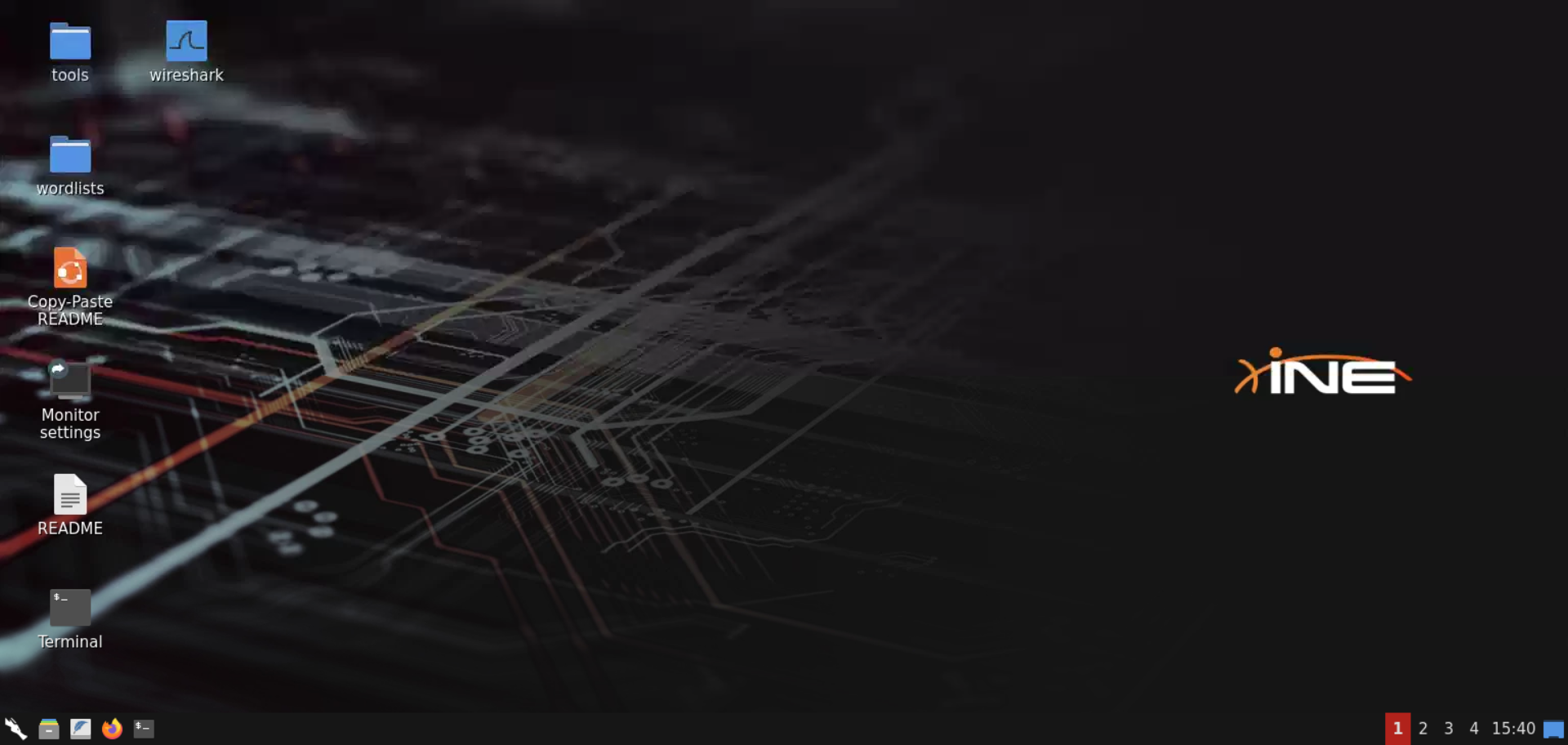
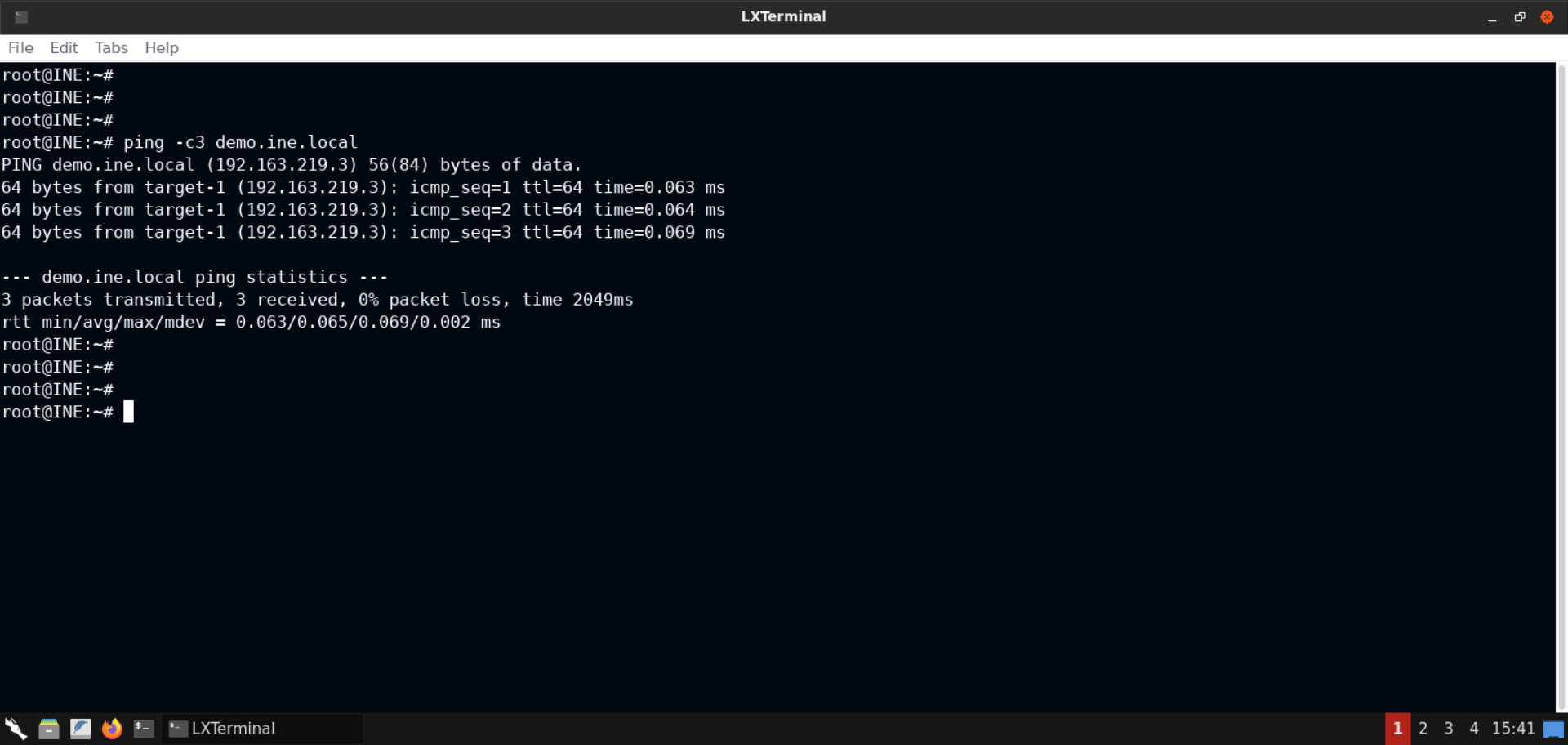
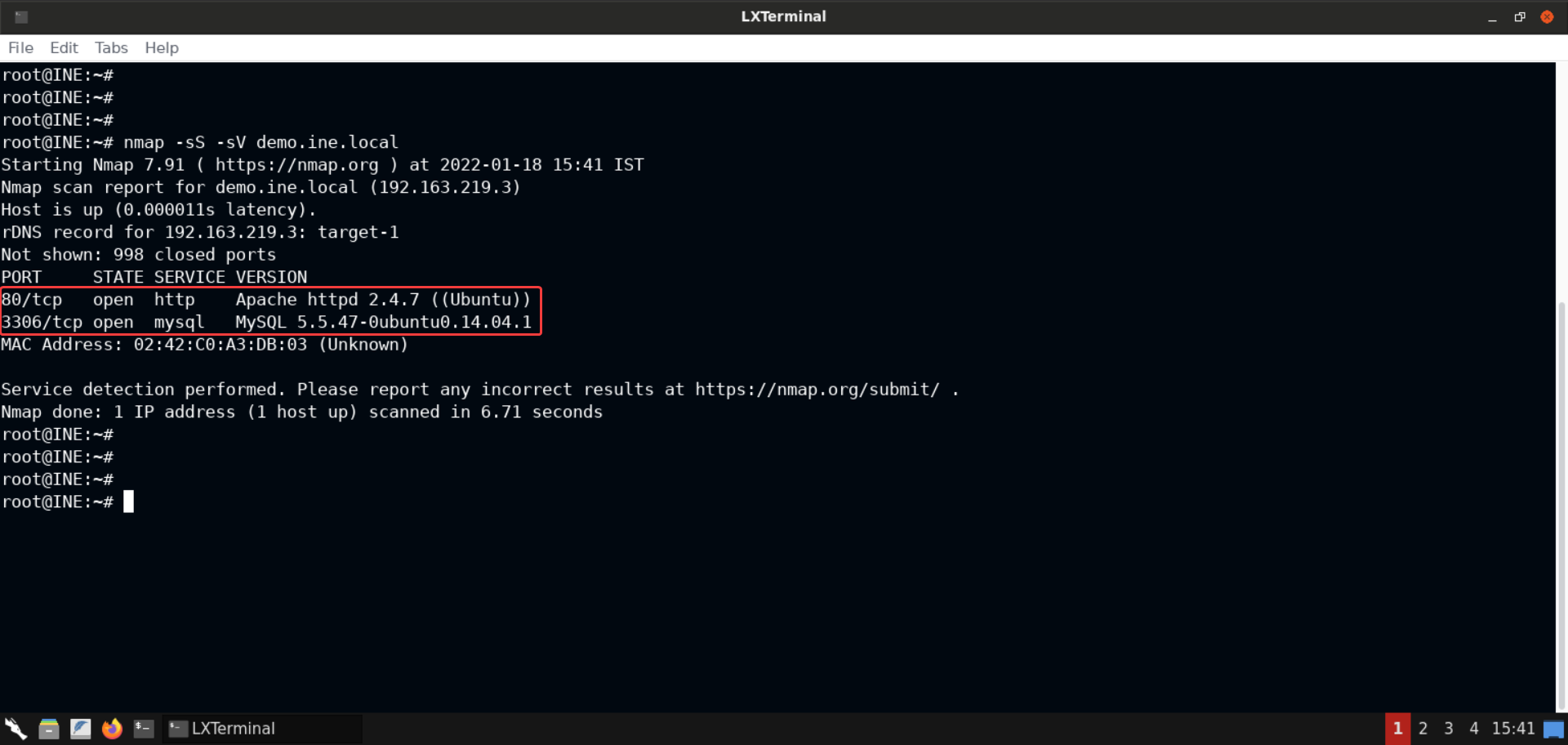
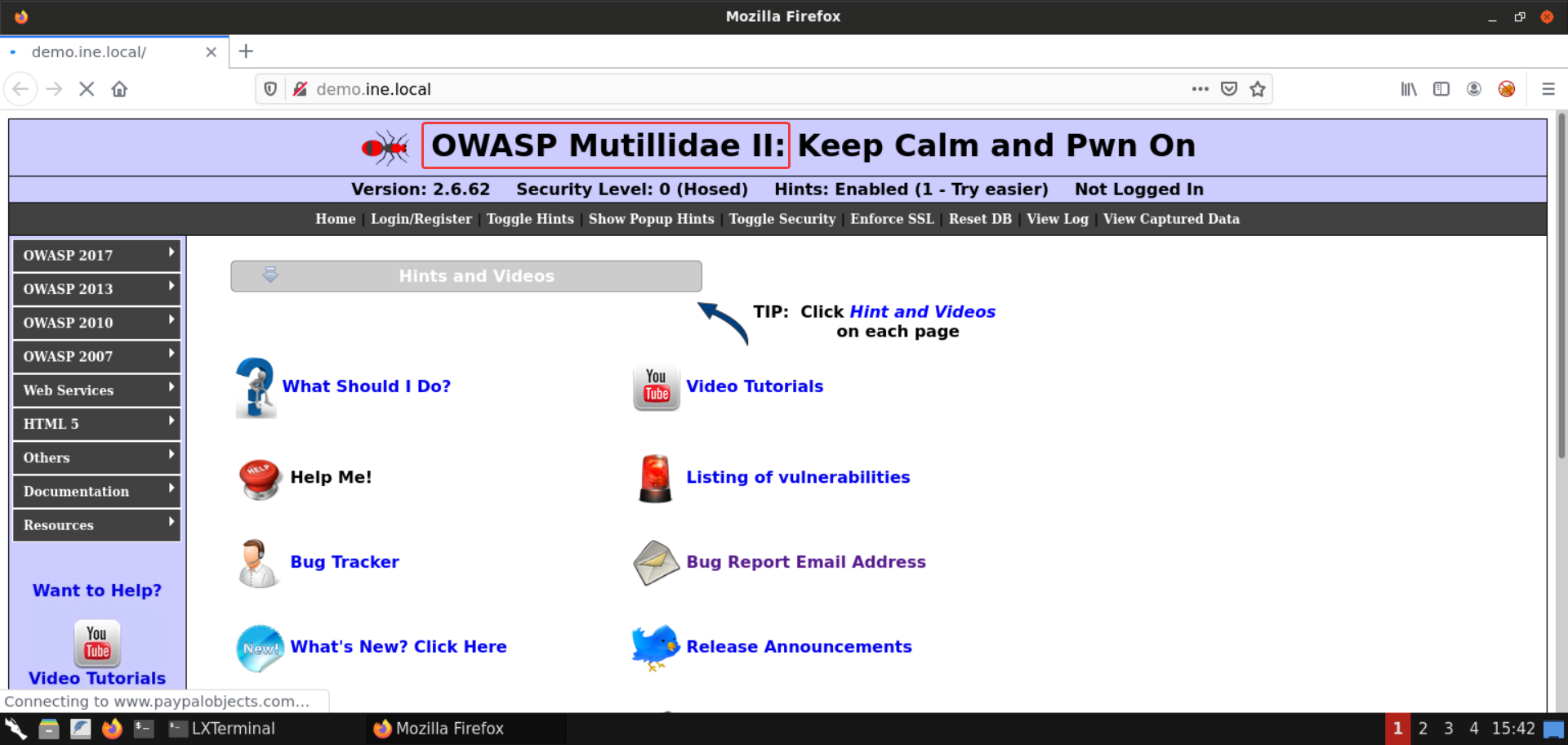
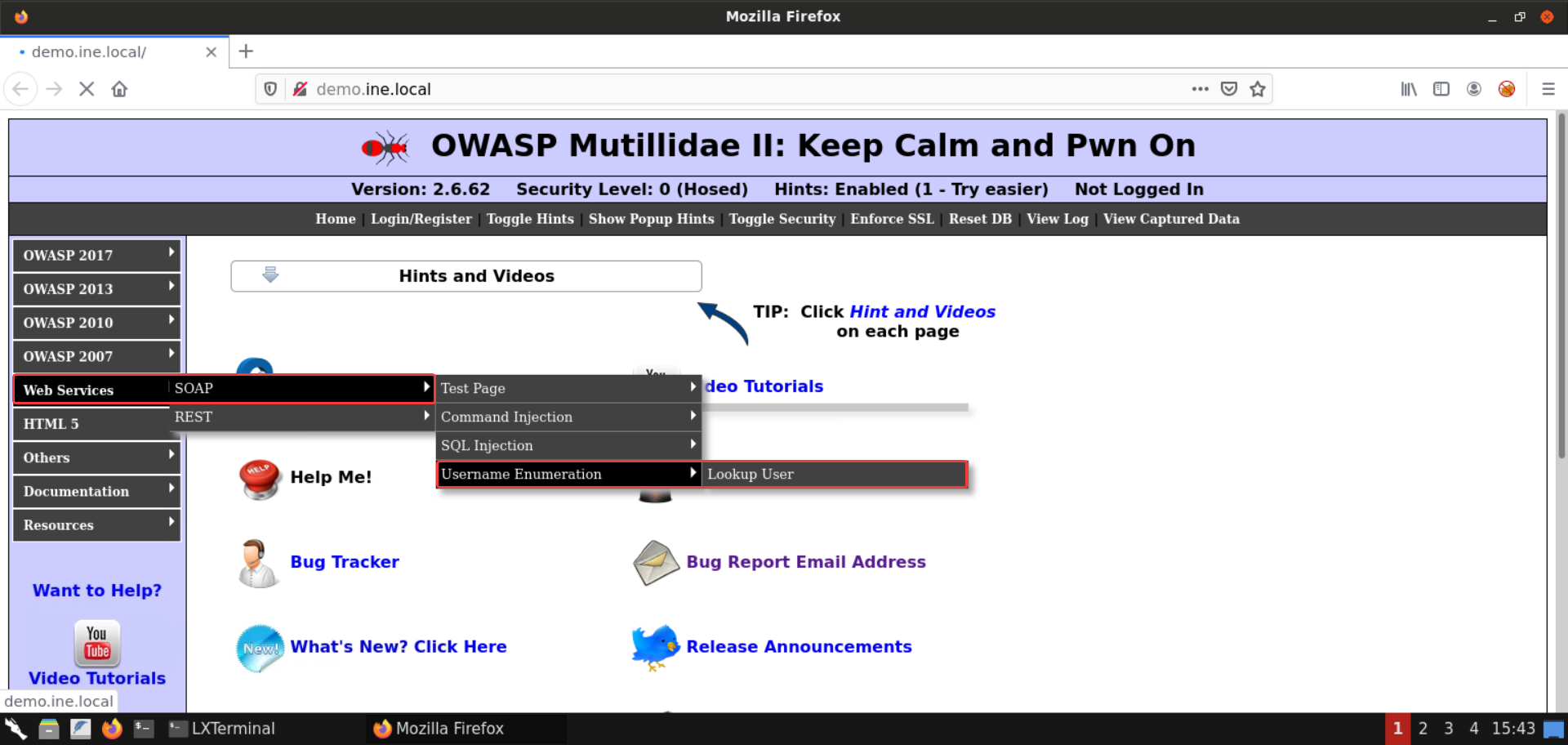
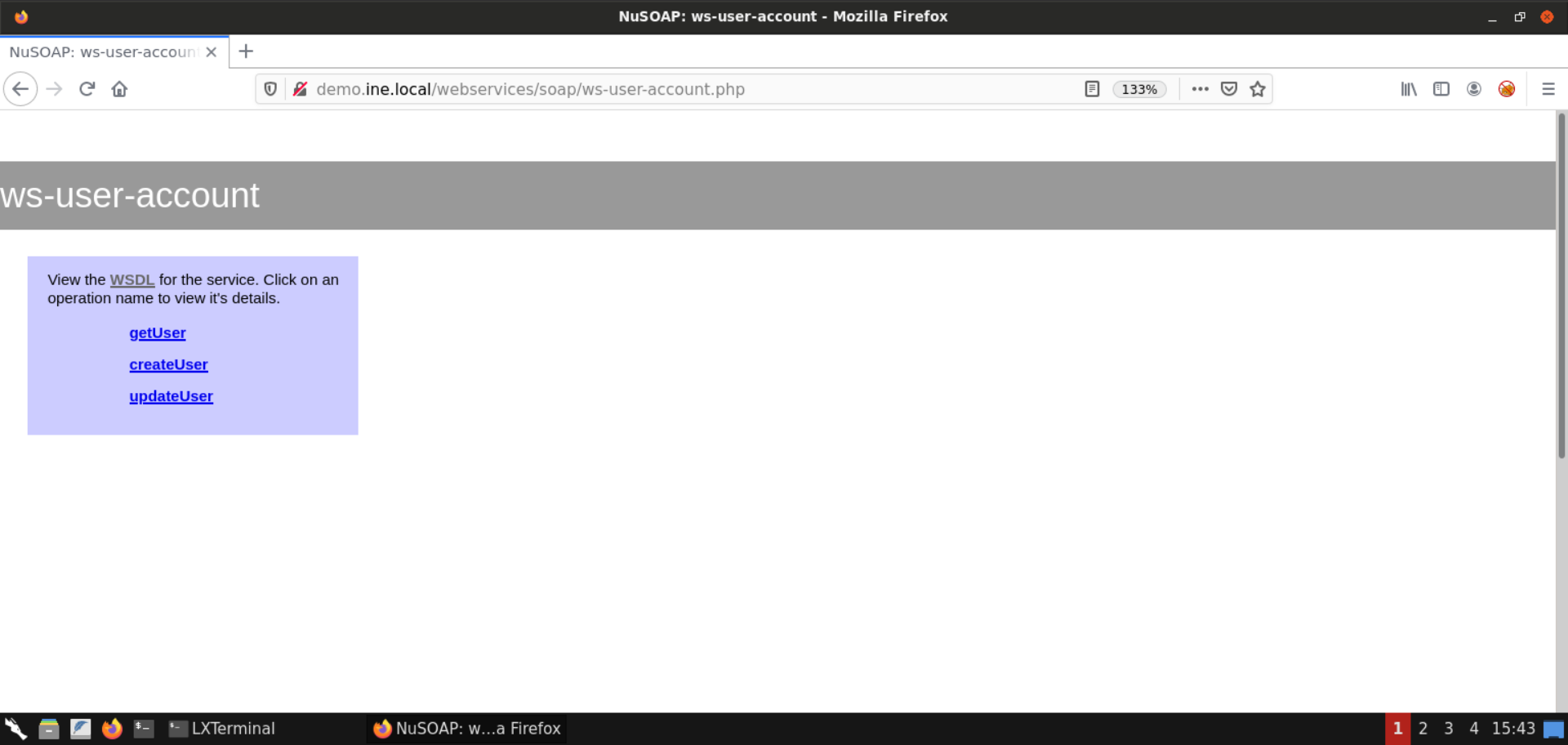
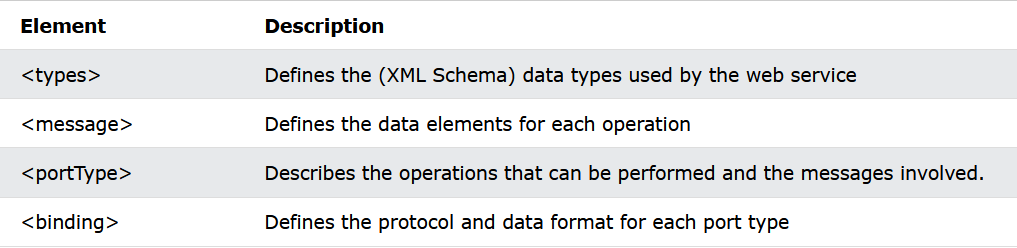
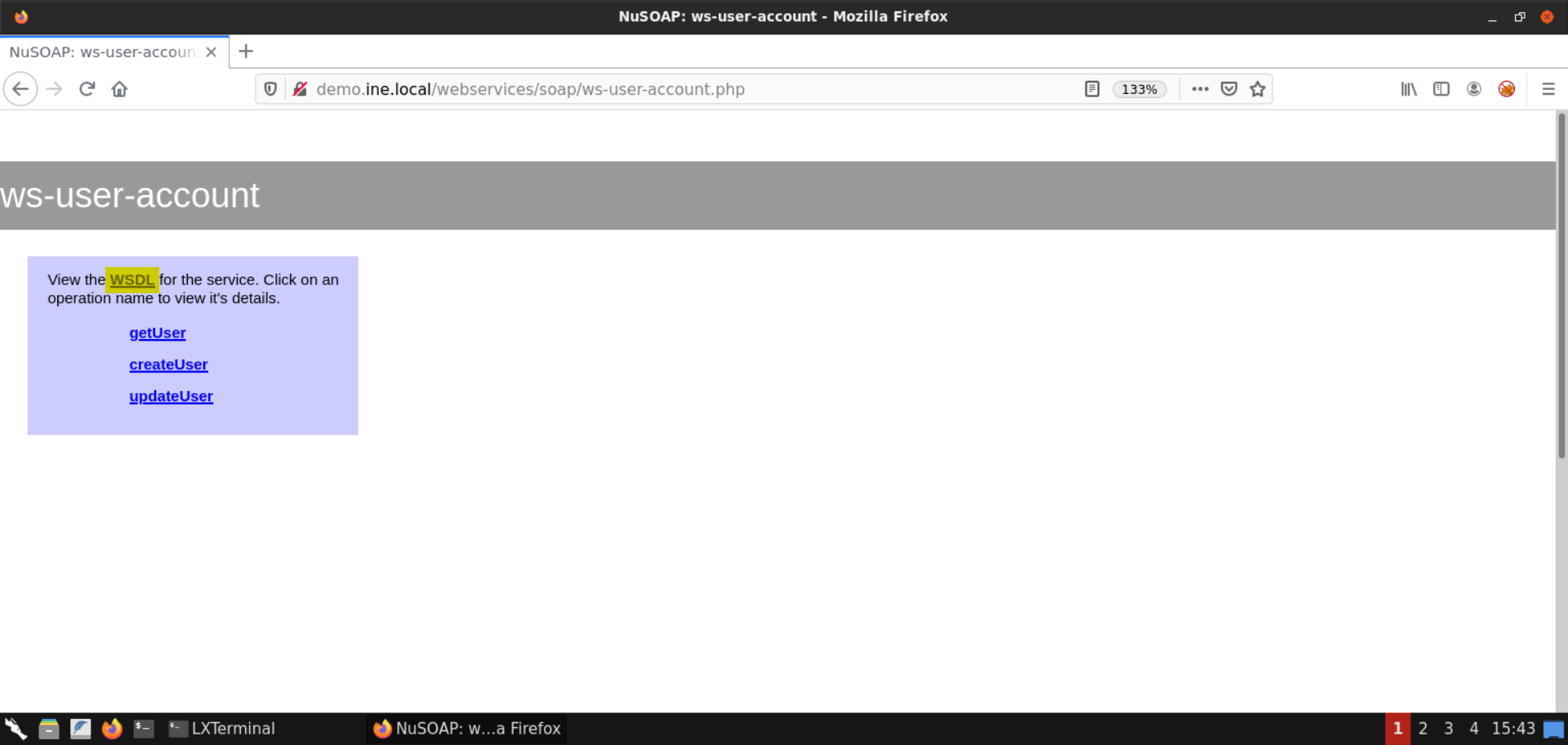
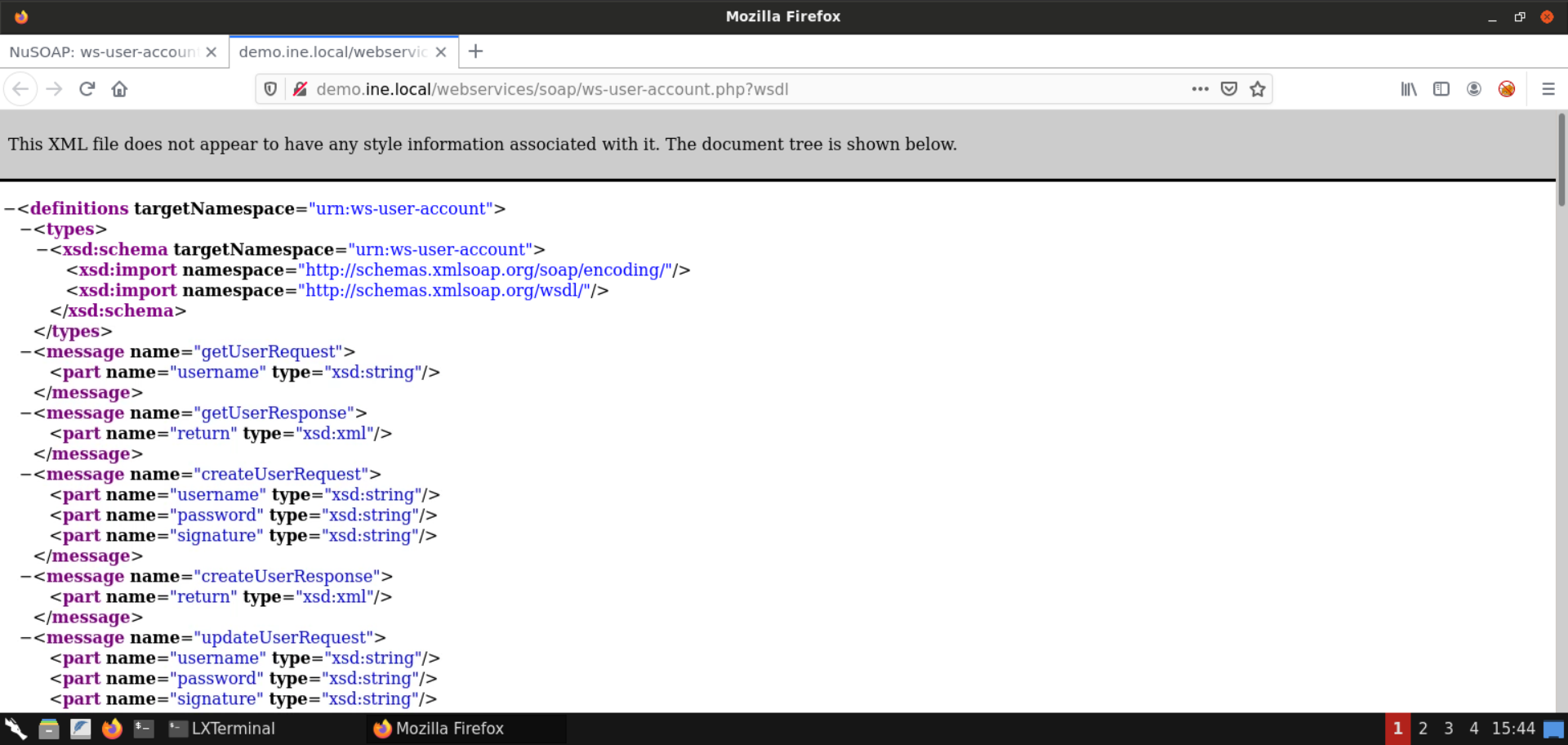
    "solutions": "# Solution\n\n**Step 1:** Open the lab link to access the Kali GUI instance.  \n\n![1](https://assets.ine.com/content/ptp/web_services/1.png)\n\n**Step 2:** Check if the provided machine/domain is reachable.  \n\n**Command:**\n```\nping -c3 demo.ine.local\n```\n\n![2](https://assets.ine.com/content/ptp/web_services/2.png)\n\nThe provided machine is reachable.  \n\n**Step 3:** Check open ports on the provided machine.\n\n**Command:**\n```\nnmap -sS -sV demo.ine.local\n```\n\n![3](https://assets.ine.com/content/ptp/web_services/3.png)\n\nPort 80 (Apache webserver) and 3306 (MySQL server) are open on the target machine.  \n\n**Step 4:** Open the browser to inspect the hosted website.  \n\n**URL:** http://demo.ine.local\n\n![4](https://assets.ine.com/content/ptp/web_services/4.png)\n\nAn instance of [**OWASP Mutillidae II**](https://github.com/webpwnized/mutillidae) is hosted on the Apache webserver.  \n\n**Step 5:** Open the **Lookup User** web service.  \n\nIn the challenge description, the link for the web services is already provided.  \n\nYou could navigate to the web services from the menus available on the web page:  \n\nVisit **Web Services** > **SOAP** > **Username Enumeration** > **Lookup User**:  \n\n![5](https://assets.ine.com/content/ptp/web_services/5.png)\n\nAlternatively you can visit the web service URL provided in the challenge description:  \n\n**URL:** http://demo.ine.local/webservices/soap/ws-user-account.php\n\nAnd that should take you to the following web page:  \n\n![5_1](https://assets.ine.com/content/ptp/web_services/5_1.png)\n\n**Step 6:** Enumerate the WSDL file.  \n\n**Information:**  \nWSDL stands for Web Services Description Language and is used to describe web services. It is written in XML.  \n\nA WSDL document describes a web service. It specifies the location of the service, and the methods of the service, using these major elements:\n\n![6](https://assets.ine.com/content/ptp/web_services/6.png)\n\n**Reference:** https://www.w3schools.com/xml/xml_wsdl.asp\n\nAnd that's why this file is quite interesting since it's a description of the web service we will be pentesting.  \n\nWe would be locating all the defined operations/methods of the service and the parameters they accept to invoke those later.  \n\nOn the web service page, click on the **WSDL** file link or append `?wsdl` to the URL:  \n\n![6_1](https://assets.ine.com/content/ptp/web_services/6_1.png)\n\nThat would show the WSDL file for the web service we will be interacting with:  \n\n![6_2](https://assets.ine.com/content/ptp/web_services/6_2.png)\n\nAs we already saw on the [W3schools WSDL page](https://www.w3schools.com/xml/xml_wsdl.asp), `<portType>` describes the operations that can be performed by the web service along with the messages (or the parameters) that have to be passed.  \n\nIf you check the WSDL for the web service, you will find that it supports five operations, namely:  \n\n- getUser\n- createUser\n- updateUser\n- getAdminInfo\n- deleteUser\n\n![6_3](https://assets.ine.com/content/ptp/web_services/6_3.png)\n![6_4](https://assets.ine.com/content/ptp/web_services/6_4.png)\n\nThe documentation for all of these operations is also available in the WSDL file.  \n\nThe conclusion is that the web service page only lists 3 out of these 5 operations. So seemingly, these operations are not meant to be invoked by the normal users and are probably reserved for the administrators.  \n\n**Step 7:** Check information on `getUser` operation.  \n\nHead back to the web service page and click on the `getUser` link:  \n\n![7](https://assets.ine.com/content/ptp/web_services/7.png)\n\nAs you can see, the information on the `getUser` operation is listed. The input, and output parameters are also listed here. All this information is also present in the WSDL file which we explored in the last step.  \n\nScroll down to view the complete request to invoke the `getUser` method of the web service:  \n\n![7_1](https://assets.ine.com/content/ptp/web_services/7_1.png)\n\n**Step 8:** Launch Burp Suite.  \n\nOpen the start menu and select: **03 - Web Application Analysis** -> **burpsuite**  \n\n![8](https://assets.ine.com/content/ptp/web_services/8.png)\n\nIf you get a warning about the JDK version, feel free to ignore it and press the **OK** button:  \n\n![8_1](https://assets.ine.com/content/ptp/web_services/8_1.png)\n\nCreate a temporary project:  \n\n![8_2](https://assets.ine.com/content/ptp/web_services/8_2.png)\n\nWe will be using the default Burp Suite configuration:  \n\n![8_3](https://assets.ine.com/content/ptp/web_services/8_3.png)\n\nAfter these steps, Burp would start up!  \n\n![8_4](https://assets.ine.com/content/ptp/web_services/8_4.png)\n\n**Step 8:** Invoke the `getUser` method.  \n\nOpen the Repeater window in Burp Suite:  \n\n![9](https://assets.ine.com/content/ptp/web_services/9.png)\n\nCopy the request to invoke the `getUser` method from the web page and paste it in the Repeater window:  \n\n![9_1](https://assets.ine.com/content/ptp/web_services/9_1.png)\n\nRemove the `/mutillidae` part of the URL as the web service is located at `/webservice` and not at `/mutillidae/webservice`.  \n\nOnce that is done, send the request.  \n\nThat should open a dialog asking for the `Host` and the `Port` of the target machine:  \n\n**Host:** demo.ine.local\n**Port:** 80\n\n![9_2](https://assets.ine.com/content/ptp/web_services/9_2.png)\n\nNow with the target configured, click on the send button again:\n\n![9_3](https://assets.ine.com/content/ptp/web_services/9_3.png)\n\nNow the request worked!  \n\nScroll down the response and you would notice the `username` and `signature` returned by the web service:  \n\n![9_4](https://assets.ine.com/content/ptp/web_services/9_4.png)\n\n**Step 10:** Invoke the `deleteUser` method.  \n\nReplace all the occurences of `getUser` with `deleteUser` and end the request:  \n\n![10](https://assets.ine.com/content/ptp/web_services/10.png)\n\nAs you can see in the above image, we got back a 200 response!  \n\nScrolling down reveals about an error:  \n\n![10_1](https://assets.ine.com/content/ptp/web_services/10_1.png)\n\nAs you can see in the above image, there's a parameter that is missing from the request sent to the web service.  \n\nBut more importantly, we were able to invoke the web service that was supposedly hidden.  \n\nHead over to the web service's WSDL file and locate `deleteUserRequest`:  \n\n![10_2](https://assets.ine.com/content/ptp/web_services/10_2.png)\n\nAs you can notice in the above image, there are two parameters accepted by this function, namely: `username` and `password`. Both of them are of the string data type.  \n\n**Step 11:** Performing SQL Injection attack.  \n\nNow we know that the `deleteUser` requires two parameters. But we don't know the password of any of the users.  \n\nWe could perform a dictionary attack. Alternatively, we could check if the web service is vulnerable to SQL Injection.  \n\nLet's go with the latter. First, we will send a single quote (`'`) as the password and see if any errors are returned from the web service:  \n\n![11](https://assets.ine.com/content/ptp/web_services/11.png)\n\nAs you can see, we again get back a 200 response.  \n\nScrolling down reveals a SQL error:  \n\n![11_1](https://assets.ine.com/content/ptp/web_services/11_1.png)\n\nThe SQL query executed by the web service is also revealed in the error message:  \n\n**SQL Query:**\n```\nSELECT username FROM accounts WHERE username='Jeremy' AND password=''';\n```\n\nAs you can see, there is a single extra quote (`'`) which invalidated the whole SQL query.  \n\nSo we are sure that an SQL Injection vulnerability is present in the web service!  \n\nNow we will send the following SQL injection payload:  \n\n```\n' or '1'='1\n```\n\nThe above payload would result in the following SQL query being executed by the web service:  \n\n**SQL Query:**\n```\nSELECT username FROM accounts WHERE username='Jeremy' AND password='' or '1'='1';\n```\n\nThe condition on the right side of the `OR` clause would always evaluate to true since `'1'='1'` and therefore, even when the conditions on the left side evaluate to false, the result would still be true!  \n\nTherefore, sending the above payload in the password field should delete the account for the user named `Jeremy`:  \n\n![11_2](https://assets.ine.com/content/ptp/web_services/11_2.png)\n\nScrolling down reveals the account deletion message:  \n\n![11_3](https://assets.ine.com/content/ptp/web_services/11_3.png)\n\nAs you can see, we also get back the first flag:  \n\n**flag1:** 6701f2d8bf691da5ee694d3a1786a7e6  \n\n**Step 12:** Invoke the `getAdminInfo` method.  \n\nCheck the WSDL file for the parameters required to invoke the `getAdminInfo` method:  \n\n![12](https://assets.ine.com/content/ptp/web_services/12.png)\n\nAs you can see in the above image, no parameters are required to invoke the `getAdminInfo` method.  \n\nScroll down to the view the documentation for the `getAdminInfo` method:  \n\n![12_1](https://assets.ine.com/content/ptp/web_services/12_1.png)\n\nThis method retrieves some (non-sensitive) account details for the admin user. A sample request has also been provided.  \n\nHead over to Burp Repeater and send the following request:  \n\n**Request:**\n```\nPOST /webservices/soap/ws-user-account.php HTTP/1.1\nAccept-Encoding: gzip,deflate\nContent-Type: text/xml;charset=UTF-8\nContent-Length: 387\nHost: localhost\nConnection: Keep-Alive\nUser-Agent: Apache-HttpClient/4.1.1 (java 1.5)\n<soapenv:Envelope xmlns:xsi=\"http://www.w3.org/2001/XMLSchema-instance\" xmlns:xsd=\"http://www.w3.org/2001/XMLSchema\" xmlns:soapenv=\"http://schemas.xmlsoap.org/soap/envelope/\" xmlns:urn=\"urn:ws-user-account\">\n<soapenv:Header/>\n<soapenv:Body>\n<urn:getAdminInfo soapenv:encodingStyle=\"http://schemas.xmlsoap.org/soap/encoding/\">\n</urn:getAdminInfo>\n</soapenv:Body>\n</soapenv:Envelope>\n```\n\n![12_2](https://assets.ine.com/content/ptp/web_services/12_2.png)\n\nSending the above request results in a 500 response!  \n\nScrolling down reveals that the only admin user could invoke this method:  \n\n![12_3](https://assets.ine.com/content/ptp/web_services/12_3.png)\n\nSo it seems like there is some restriction on the invocation of this method.  \n\n**Step 13:** Bypass the SOAP body restrictions using the SOAPAction header.  \n\nThere is possibly a restriction on the invocation of the `getAdminInfo` method.  \n\nAn alternative way to invoke a web service method is by using the SOAPAction header.  \n\n**Information:**  \nThe SOAPAction header is a transport protocol header (either HTTP or JMS). It is transmitted with SOAP messages, and provides information about the intention of the web service request, to the service. The WSDL interface for a web service defines the SOAPAction header value used for each operation. Some web service implementations use the SOAPAction header to determine behavior.\n\n**Reference:** https://www.ibm.com/docs/en/baw/19.x?topic=binding-protocol-headers  \n\nHead over to the WSDL file for the web service and inspect the `soapaction` attribute for the `getAdminInfo` operation:  \n\n![13](https://assets.ine.com/content/ptp/web_services/13.png)\n\n**SOAPAction attribute value:**  \n```\nurn:ws-user-account#getAdminInfo\n```\n\nNow head over to the Burp Repeater window and send the following request:  \n\n**Request:**\n```\nPOST /webservices/soap/ws-user-account.php HTTP/1.1\nAccept-Encoding: gzip,deflate\nContent-Type: text/xml;charset=UTF-8\nContent-Length: 228\nHost: localhost\nConnection: Keep-Alive\nUser-Agent: Apache-HttpClient/4.1.1 (java 1.5)\nSOAPAction: urn:ws-user-account#getAdminInfo\n<soapenv:Envelope xmlns:xsi=\"http://www.w3.org/2001/XMLSchema-instance\" xmlns:xsd=\"http://www.w3.org/2001/XMLSchema\" xmlns:soapenv=\"http://schemas.xmlsoap.org/soap/envelope/\" xmlns:urn=\"urn:ws-user-account\">\n</soapenv:Envelope>\n```\n\nAs you can notice, we are sending the SOAPAction header and have removed the SOAP request header and body.  \n\n![13_1](https://assets.ine.com/content/ptp/web_services/13_1.png)\n\nSending the above request results in a 200 response!  \n\nScrolling down the response shows the details for the admin user and the second flag:  \n\n![13_2](https://assets.ine.com/content/ptp/web_services/13_2.png)\n\n**flag2:** 4315749f21a66fad53895daccbebf309  \n\n**So that was all about WSDL enumeration, invoking hidden methods, performing SQL injection and bypassing SOAP body restrictions.**  \n\n# Performing command injection attacks against the DNS Lookup web service.  \n\n**Step 14:** Open the DNS Lookup web service.  \n\nVisit **Web Services** > **SOAP** > **Command Injection** > **DNS Lookup**:  \n\n![14](https://assets.ine.com/content/ptp/web_services/14.png)\n\nThat would take you to the following web page:  \n\n![14_1](https://assets.ine.com/content/ptp/web_services/14_1.png)\n\n**Step 15:** Check the WSDL file.  \n\nClick on the WSDL link to view the WSDL file for the provided web service:  \n\n![15](https://assets.ine.com/content/ptp/web_services/15.png)\n\nAs you can see in the above image, `lookupDNS` is the only available operation:   \n\n![15_1](https://assets.ine.com/content/ptp/web_services/15_1.png)\n\nViewing the details for the `lookupDNS` operation:  \n\n![15_2](https://assets.ine.com/content/ptp/web_services/15_2.png)\n\nThe information on the web page reveals the input and output parameters expected by this operation. All this information could be inferred directly from the WSDL file as well.  \n\nScroll down to view the sample request:  \n\n![15_3](https://assets.ine.com/content/ptp/web_services/15_3.png)\n\n**Step 16:** Interact with the web service using Burp Suite.  \n\nCopy the sample request for the `lookupDNS` method to the Burp Repeater window:  \n\n![16](https://assets.ine.com/content/ptp/web_services/16.png)\n\nRemove the `/mutillidae` part of the URL as the web service is located at `/webservice` and not at `/mutillidae/webservice`.  \n\nOnce that is done, send the request:  \n\n![16_1](https://assets.ine.com/content/ptp/web_services/16_1.png)\n\nWe got back a 200 response!  \n\nScroll down to view the DNS Lookup results:  \n\n![16_2](https://assets.ine.com/content/ptp/web_services/16_2.png)\n\n**Step 17:** Identifying command injection vulnerability.  \n\nSend a semicolon (`;`) instead of a hostname:  \n\n![17](https://assets.ine.com/content/ptp/web_services/17.png)\n\nScroll down to view the DNS Lookup results:  \n\n![17_1](https://assets.ine.com/content/ptp/web_services/17_1.png)\n\nNotice that the provided hostname was used as is and no errors were reported.  \n\nSend the following payload to the web service:  \n\n**Payload:**\n```\n;ls -al\n```\n\nSending the above payload results in a 200 response:  \n\n![17_2](https://assets.ine.com/content/ptp/web_services/17_2.png)\n\nScroll down to view the DNS Lookup results:  \n\n![17_3](https://assets.ine.com/content/ptp/web_services/17_3.png)\n\nNotice that the output for the `ls -al` command is retrieved!  \n\nSo the web service is indeed vulnerable to command injection vulnerability.  \n\n**Step 18:** Retrieve the flag.  \n\nSince the DNS Lookup web service is vulnerable to a command injection vulnerability, send the following command to find the flag file:  \n\n**Payload:**\n```\n;find / -iname *flag* 2>/dev/null\n```\n\nSending the above payload results in a 200 response:  \n\n![18](https://assets.ine.com/content/ptp/web_services/18.png)\n\nThe output reveals that the third flag is present in the file `/app/flag3`.  \n\nSend the following payload to read the flag file:\n\n**Payload:**\n```\n;cat /app/flag3\n```\n\n![18_1](https://assets.ine.com/content/ptp/web_services/18_1.png)\n\n**flag3:** 6ae5422a0f086335766e1de8f75c16b7\n\n**So that was all about performing command injection attacks against web services.**  \n\nAnd with that, we conclude this lab on attacking web services. There was a lot of ground to cover in this lab and we learned quite a lot of techniques to pentest SOAP-based web services and bypass SOAP body restrictions.  \n\n\n# References\n\n- [OWASP Mutillidae II](https://github.com/webpwnized/mutillidae)\n- [Burp Suite](https://portswigger.net/burp)\n- [Nmap](https://nmap.org/)\n- [XML WSDL](https://www.w3schools.com/xml/xml_wsdl.asp)\n- [SOAPAction Header](https://www.ibm.com/docs/en/baw/19.x?topic=binding-protocol-headers)",
    "solutions_html": "<h1>Solution</h1>\n<p><strong>Step 1:</strong> Open the lab link to access the Kali GUI instance.  </p>\n<p><img alt=\"1\" src=\"https://assets.ine.com/content/ptp/web_services/1.png\" /></p>\n<p><strong>Step 2:</strong> Check if the provided machine/domain is reachable.  </p>\n<p><strong>Command:</strong>\n<pre class=\"codehilite\"><code>ping -c3 demo.ine.local</code></pre></p>\n<p><img alt=\"2\" src=\"https://assets.ine.com/content/ptp/web_services/2.png\" /></p>\n<p>The provided machine is reachable.  </p>\n<p><strong>Step 3:</strong> Check open ports on the provided machine.</p>\n<p><strong>Command:</strong>\n<pre class=\"codehilite\"><code>nmap -sS -sV demo.ine.local</code></pre></p>\n<p><img alt=\"3\" src=\"https://assets.ine.com/content/ptp/web_services/3.png\" /></p>\n<p>Port 80 (Apache webserver) and 3306 (MySQL server) are open on the target machine.  </p>\n<p><strong>Step 4:</strong> Open the browser to inspect the hosted website.  </p>\n<p><strong>URL:</strong> http://demo.ine.local</p>\n<p><img alt=\"4\" src=\"https://assets.ine.com/content/ptp/web_services/4.png\" /></p>\n<p>An instance of <a href=\"https://github.com/webpwnized/mutillidae\"><strong>OWASP Mutillidae II</strong></a> is hosted on the Apache webserver.  </p>\n<p><strong>Step 5:</strong> Open the <strong>Lookup User</strong> web service.  </p>\n<p>In the challenge description, the link for the web services is already provided.  </p>\n<p>You could navigate to the web services from the menus available on the web page:  </p>\n<p>Visit <strong>Web Services</strong> &gt; <strong>SOAP</strong> &gt; <strong>Username Enumeration</strong> &gt; <strong>Lookup User</strong>:  </p>\n<p><img alt=\"5\" src=\"https://assets.ine.com/content/ptp/web_services/5.png\" /></p>\n<p>Alternatively you can visit the web service URL provided in the challenge description:  </p>\n<p><strong>URL:</strong> http://demo.ine.local/webservices/soap/ws-user-account.php</p>\n<p>And that should take you to the following web page:  </p>\n<p><img alt=\"5_1\" src=\"https://assets.ine.com/content/ptp/web_services/5_1.png\" /></p>\n<p><strong>Step 6:</strong> Enumerate the WSDL file.  </p>\n<p><strong>Information:</strong><br />\nWSDL stands for Web Services Description Language and is used to describe web services. It is written in XML.  </p>\n<p>A WSDL document describes a web service. It specifies the location of the service, and the methods of the service, using these major elements:</p>\n<p><img alt=\"6\" src=\"https://assets.ine.com/content/ptp/web_services/6.png\" /></p>\n<p><strong>Reference:</strong> https://www.w3schools.com/xml/xml_wsdl.asp</p>\n<p>And that's why this file is quite interesting since it's a description of the web service we will be pentesting.  </p>\n<p>We would be locating all the defined operations/methods of the service and the parameters they accept to invoke those later.  </p>\n<p>On the web service page, click on the <strong>WSDL</strong> file link or append <code>?wsdl</code> to the URL:  </p>\n<p><img alt=\"6_1\" src=\"https://assets.ine.com/content/ptp/web_services/6_1.png\" /></p>\n<p>That would show the WSDL file for the web service we will be interacting with:  </p>\n<p><img alt=\"6_2\" src=\"https://assets.ine.com/content/ptp/web_services/6_2.png\" /></p>\n<p>As we already saw on the <a href=\"https://www.w3schools.com/xml/xml_wsdl.asp\">W3schools WSDL page</a>, <code>&lt;portType&gt;</code> describes the operations that can be performed by the web service along with the messages (or the parameters) that have to be passed.  </p>\n<p>If you check the WSDL for the web service, you will find that it supports five operations, namely:  </p>\n<ul>\n<li>getUser</li>\n<li>createUser</li>\n<li>updateUser</li>\n<li>getAdminInfo</li>\n<li>deleteUser</li>\n</ul>\n<p><img alt=\"6_3\" src=\"https://assets.ine.com/content/ptp/web_services/6_3.png\" />\n<img alt=\"6_4\" src=\"https://assets.ine.com/content/ptp/web_services/6_4.png\" /></p>\n<p>The documentation for all of these operations is also available in the WSDL file.  </p>\n<p>The conclusion is that the web service page only lists 3 out of these 5 operations. So seemingly, these operations are not meant to be invoked by the normal users and are probably reserved for the administrators.  </p>\n<p><strong>Step 7:</strong> Check information on <code>getUser</code> operation.  </p>\n<p>Head back to the web service page and click on the <code>getUser</code> link:  </p>\n<p><img alt=\"7\" src=\"https://assets.ine.com/content/ptp/web_services/7.png\" /></p>\n<p>As you can see, the information on the <code>getUser</code> operation is listed. The input, and output parameters are also listed here. All this information is also present in the WSDL file which we explored in the last step.  </p>\n<p>Scroll down to view the complete request to invoke the <code>getUser</code> method of the web service:  </p>\n<p><img alt=\"7_1\" src=\"https://assets.ine.com/content/ptp/web_services/7_1.png\" /></p>\n<p><strong>Step 8:</strong> Launch Burp Suite.  </p>\n<p>Open the start menu and select: <strong>03 - Web Application Analysis</strong> -&gt; <strong>burpsuite</strong>  </p>\n<p><img alt=\"8\" src=\"https://assets.ine.com/content/ptp/web_services/8.png\" /></p>\n<p>If you get a warning about the JDK version, feel free to ignore it and press the <strong>OK</strong> button:  </p>\n<p><img alt=\"8_1\" src=\"https://assets.ine.com/content/ptp/web_services/8_1.png\" /></p>\n<p>Create a temporary project:  </p>\n<p><img alt=\"8_2\" src=\"https://assets.ine.com/content/ptp/web_services/8_2.png\" /></p>\n<p>We will be using the default Burp Suite configuration:  </p>\n<p><img alt=\"8_3\" src=\"https://assets.ine.com/content/ptp/web_services/8_3.png\" /></p>\n<p>After these steps, Burp would start up!  </p>\n<p><img alt=\"8_4\" src=\"https://assets.ine.com/content/ptp/web_services/8_4.png\" /></p>\n<p><strong>Step 8:</strong> Invoke the <code>getUser</code> method.  </p>\n<p>Open the Repeater window in Burp Suite:  </p>\n<p><img alt=\"9\" src=\"https://assets.ine.com/content/ptp/web_services/9.png\" /></p>\n<p>Copy the request to invoke the <code>getUser</code> method from the web page and paste it in the Repeater window:  </p>\n<p><img alt=\"9_1\" src=\"https://assets.ine.com/content/ptp/web_services/9_1.png\" /></p>\n<p>Remove the <code>/mutillidae</code> part of the URL as the web service is located at <code>/webservice</code> and not at <code>/mutillidae/webservice</code>.  </p>\n<p>Once that is done, send the request.  </p>\n<p>That should open a dialog asking for the <code>Host</code> and the <code>Port</code> of the target machine:  </p>\n<p><strong>Host:</strong> demo.ine.local\n<strong>Port:</strong> 80</p>\n<p><img alt=\"9_2\" src=\"https://assets.ine.com/content/ptp/web_services/9_2.png\" /></p>\n<p>Now with the target configured, click on the send button again:</p>\n<p><img alt=\"9_3\" src=\"https://assets.ine.com/content/ptp/web_services/9_3.png\" /></p>\n<p>Now the request worked!  </p>\n<p>Scroll down the response and you would notice the <code>username</code> and <code>signature</code> returned by the web service:  </p>\n<p><img alt=\"9_4\" src=\"https://assets.ine.com/content/ptp/web_services/9_4.png\" /></p>\n<p><strong>Step 10:</strong> Invoke the <code>deleteUser</code> method.  </p>\n<p>Replace all the occurences of <code>getUser</code> with <code>deleteUser</code> and end the request:  </p>\n<p><img alt=\"10\" src=\"https://assets.ine.com/content/ptp/web_services/10.png\" /></p>\n<p>As you can see in the above image, we got back a 200 response!  </p>\n<p>Scrolling down reveals about an error:  </p>\n<p><img alt=\"10_1\" src=\"https://assets.ine.com/content/ptp/web_services/10_1.png\" /></p>\n<p>As you can see in the above image, there's a parameter that is missing from the request sent to the web service.  </p>\n<p>But more importantly, we were able to invoke the web service that was supposedly hidden.  </p>\n<p>Head over to the web service's WSDL file and locate <code>deleteUserRequest</code>:  </p>\n<p><img alt=\"10_2\" src=\"https://assets.ine.com/content/ptp/web_services/10_2.png\" /></p>\n<p>As you can notice in the above image, there are two parameters accepted by this function, namely: <code>username</code> and <code>password</code>. Both of them are of the string data type.  </p>\n<p><strong>Step 11:</strong> Performing SQL Injection attack.  </p>\n<p>Now we know that the <code>deleteUser</code> requires two parameters. But we don't know the password of any of the users.  </p>\n<p>We could perform a dictionary attack. Alternatively, we could check if the web service is vulnerable to SQL Injection.  </p>\n<p>Let's go with the latter. First, we will send a single quote (<code>'</code>) as the password and see if any errors are returned from the web service:  </p>\n<p><img alt=\"11\" src=\"https://assets.ine.com/content/ptp/web_services/11.png\" /></p>\n<p>As you can see, we again get back a 200 response.  </p>\n<p>Scrolling down reveals a SQL error:  </p>\n<p><img alt=\"11_1\" src=\"https://assets.ine.com/content/ptp/web_services/11_1.png\" /></p>\n<p>The SQL query executed by the web service is also revealed in the error message:  </p>\n<p><strong>SQL Query:</strong>\n<pre class=\"codehilite\"><code>SELECT username FROM accounts WHERE username='Jeremy' AND password=''';</code></pre></p>\n<p>As you can see, there is a single extra quote (<code>'</code>) which invalidated the whole SQL query.  </p>\n<p>So we are sure that an SQL Injection vulnerability is present in the web service!  </p>\n<p>Now we will send the following SQL injection payload:  </p>\n<pre class=\"codehilite\"><code>' or '1'='1</code></pre>\n\n<p>The above payload would result in the following SQL query being executed by the web service:  </p>\n<p><strong>SQL Query:</strong>\n<pre class=\"codehilite\"><code>SELECT username FROM accounts WHERE username='Jeremy' AND password='' or '1'='1';</code></pre></p>\n<p>The condition on the right side of the <code>OR</code> clause would always evaluate to true since <code>'1'='1'</code> and therefore, even when the conditions on the left side evaluate to false, the result would still be true!  </p>\n<p>Therefore, sending the above payload in the password field should delete the account for the user named <code>Jeremy</code>:  </p>\n<p><img alt=\"11_2\" src=\"https://assets.ine.com/content/ptp/web_services/11_2.png\" /></p>\n<p>Scrolling down reveals the account deletion message:  </p>\n<p><img alt=\"11_3\" src=\"https://assets.ine.com/content/ptp/web_services/11_3.png\" /></p>\n<p>As you can see, we also get back the first flag:  </p>\n<p><strong>flag1:</strong> 6701f2d8bf691da5ee694d3a1786a7e6  </p>\n<p><strong>Step 12:</strong> Invoke the <code>getAdminInfo</code> method.  </p>\n<p>Check the WSDL file for the parameters required to invoke the <code>getAdminInfo</code> method:  </p>\n<p><img alt=\"12\" src=\"https://assets.ine.com/content/ptp/web_services/12.png\" /></p>\n<p>As you can see in the above image, no parameters are required to invoke the <code>getAdminInfo</code> method.  </p>\n<p>Scroll down to the view the documentation for the <code>getAdminInfo</code> method:  </p>\n<p><img alt=\"12_1\" src=\"https://assets.ine.com/content/ptp/web_services/12_1.png\" /></p>\n<p>This method retrieves some (non-sensitive) account details for the admin user. A sample request has also been provided.  </p>\n<p>Head over to Burp Repeater and send the following request:  </p>\n<p><strong>Request:</strong>\n<pre class=\"codehilite\"><code>POST /webservices/soap/ws-user-account.php HTTP/1.1\nAccept-Encoding: gzip,deflate\nContent-Type: text/xml;charset=UTF-8\nContent-Length: 387\nHost: localhost\nConnection: Keep-Alive\nUser-Agent: Apache-HttpClient/4.1.1 (java 1.5)\n&lt;soapenv:Envelope xmlns:xsi=\"http://www.w3.org/2001/XMLSchema-instance\" xmlns:xsd=\"http://www.w3.org/2001/XMLSchema\" xmlns:soapenv=\"http://schemas.xmlsoap.org/soap/envelope/\" xmlns:urn=\"urn:ws-user-account\"&gt;\n&lt;soapenv:Header/&gt;\n&lt;soapenv:Body&gt;\n&lt;urn:getAdminInfo soapenv:encodingStyle=\"http://schemas.xmlsoap.org/soap/encoding/\"&gt;\n&lt;/urn:getAdminInfo&gt;\n&lt;/soapenv:Body&gt;\n&lt;/soapenv:Envelope&gt;</code></pre></p>\n<p><img alt=\"12_2\" src=\"https://assets.ine.com/content/ptp/web_services/12_2.png\" /></p>\n<p>Sending the above request results in a 500 response!  </p>\n<p>Scrolling down reveals that the only admin user could invoke this method:  </p>\n<p><img alt=\"12_3\" src=\"https://assets.ine.com/content/ptp/web_services/12_3.png\" /></p>\n<p>So it seems like there is some restriction on the invocation of this method.  </p>\n<p><strong>Step 13:</strong> Bypass the SOAP body restrictions using the SOAPAction header.  </p>\n<p>There is possibly a restriction on the invocation of the <code>getAdminInfo</code> method.  </p>\n<p>An alternative way to invoke a web service method is by using the SOAPAction header.  </p>\n<p><strong>Information:</strong><br />\nThe SOAPAction header is a transport protocol header (either HTTP or JMS). It is transmitted with SOAP messages, and provides information about the intention of the web service request, to the service. The WSDL interface for a web service defines the SOAPAction header value used for each operation. Some web service implementations use the SOAPAction header to determine behavior.</p>\n<p><strong>Reference:</strong> https://www.ibm.com/docs/en/baw/19.x?topic=binding-protocol-headers  </p>\n<p>Head over to the WSDL file for the web service and inspect the <code>soapaction</code> attribute for the <code>getAdminInfo</code> operation:  </p>\n<p><img alt=\"13\" src=\"https://assets.ine.com/content/ptp/web_services/13.png\" /></p>\n<p><strong>SOAPAction attribute value:</strong><br />\n<pre class=\"codehilite\"><code>urn:ws-user-account#getAdminInfo</code></pre></p>\n<p>Now head over to the Burp Repeater window and send the following request:  </p>\n<p><strong>Request:</strong>\n<pre class=\"codehilite\"><code>POST /webservices/soap/ws-user-account.php HTTP/1.1\nAccept-Encoding: gzip,deflate\nContent-Type: text/xml;charset=UTF-8\nContent-Length: 228\nHost: localhost\nConnection: Keep-Alive\nUser-Agent: Apache-HttpClient/4.1.1 (java 1.5)\nSOAPAction: urn:ws-user-account#getAdminInfo\n&lt;soapenv:Envelope xmlns:xsi=\"http://www.w3.org/2001/XMLSchema-instance\" xmlns:xsd=\"http://www.w3.org/2001/XMLSchema\" xmlns:soapenv=\"http://schemas.xmlsoap.org/soap/envelope/\" xmlns:urn=\"urn:ws-user-account\"&gt;\n&lt;/soapenv:Envelope&gt;</code></pre></p>\n<p>As you can notice, we are sending the SOAPAction header and have removed the SOAP request header and body.  </p>\n<p><img alt=\"13_1\" src=\"https://assets.ine.com/content/ptp/web_services/13_1.png\" /></p>\n<p>Sending the above request results in a 200 response!  </p>\n<p>Scrolling down the response shows the details for the admin user and the second flag:  </p>\n<p><img alt=\"13_2\" src=\"https://assets.ine.com/content/ptp/web_services/13_2.png\" /></p>\n<p><strong>flag2:</strong> 4315749f21a66fad53895daccbebf309  </p>\n<p><strong>So that was all about WSDL enumeration, invoking hidden methods, performing SQL injection and bypassing SOAP body restrictions.</strong>  </p>\n<h1>Performing command injection attacks against the DNS Lookup web service.</h1>\n<p><strong>Step 14:</strong> Open the DNS Lookup web service.  </p>\n<p>Visit <strong>Web Services</strong> &gt; <strong>SOAP</strong> &gt; <strong>Command Injection</strong> &gt; <strong>DNS Lookup</strong>:  </p>\n<p><img alt=\"14\" src=\"https://assets.ine.com/content/ptp/web_services/14.png\" /></p>\n<p>That would take you to the following web page:  </p>\n<p><img alt=\"14_1\" src=\"https://assets.ine.com/content/ptp/web_services/14_1.png\" /></p>\n<p><strong>Step 15:</strong> Check the WSDL file.  </p>\n<p>Click on the WSDL link to view the WSDL file for the provided web service:  </p>\n<p><img alt=\"15\" src=\"https://assets.ine.com/content/ptp/web_services/15.png\" /></p>\n<p>As you can see in the above image, <code>lookupDNS</code> is the only available operation:   </p>\n<p><img alt=\"15_1\" src=\"https://assets.ine.com/content/ptp/web_services/15_1.png\" /></p>\n<p>Viewing the details for the <code>lookupDNS</code> operation:  </p>\n<p><img alt=\"15_2\" src=\"https://assets.ine.com/content/ptp/web_services/15_2.png\" /></p>\n<p>The information on the web page reveals the input and output parameters expected by this operation. All this information could be inferred directly from the WSDL file as well.  </p>\n<p>Scroll down to view the sample request:  </p>\n<p><img alt=\"15_3\" src=\"https://assets.ine.com/content/ptp/web_services/15_3.png\" /></p>\n<p><strong>Step 16:</strong> Interact with the web service using Burp Suite.  </p>\n<p>Copy the sample request for the <code>lookupDNS</code> method to the Burp Repeater window:  </p>\n<p><img alt=\"16\" src=\"https://assets.ine.com/content/ptp/web_services/16.png\" /></p>\n<p>Remove the <code>/mutillidae</code> part of the URL as the web service is located at <code>/webservice</code> and not at <code>/mutillidae/webservice</code>.  </p>\n<p>Once that is done, send the request:  </p>\n<p><img alt=\"16_1\" src=\"https://assets.ine.com/content/ptp/web_services/16_1.png\" /></p>\n<p>We got back a 200 response!  </p>\n<p>Scroll down to view the DNS Lookup results:  </p>\n<p><img alt=\"16_2\" src=\"https://assets.ine.com/content/ptp/web_services/16_2.png\" /></p>\n<p><strong>Step 17:</strong> Identifying command injection vulnerability.  </p>\n<p>Send a semicolon (<code>;</code>) instead of a hostname:  </p>\n<p><img alt=\"17\" src=\"https://assets.ine.com/content/ptp/web_services/17.png\" /></p>\n<p>Scroll down to view the DNS Lookup results:  </p>\n<p><img alt=\"17_1\" src=\"https://assets.ine.com/content/ptp/web_services/17_1.png\" /></p>\n<p>Notice that the provided hostname was used as is and no errors were reported.  </p>\n<p>Send the following payload to the web service:  </p>\n<p><strong>Payload:</strong>\n<pre class=\"codehilite\"><code>;ls -al</code></pre></p>\n<p>Sending the above payload results in a 200 response:  </p>\n<p><img alt=\"17_2\" src=\"https://assets.ine.com/content/ptp/web_services/17_2.png\" /></p>\n<p>Scroll down to view the DNS Lookup results:  </p>\n<p><img alt=\"17_3\" src=\"https://assets.ine.com/content/ptp/web_services/17_3.png\" /></p>\n<p>Notice that the output for the <code>ls -al</code> command is retrieved!  </p>\n<p>So the web service is indeed vulnerable to command injection vulnerability.  </p>\n<p><strong>Step 18:</strong> Retrieve the flag.  </p>\n<p>Since the DNS Lookup web service is vulnerable to a command injection vulnerability, send the following command to find the flag file:  </p>\n<p><strong>Payload:</strong>\n<pre class=\"codehilite\"><code>;find / -iname *flag* 2&gt;/dev/null</code></pre></p>\n<p>Sending the above payload results in a 200 response:  </p>\n<p><img alt=\"18\" src=\"https://assets.ine.com/content/ptp/web_services/18.png\" /></p>\n<p>The output reveals that the third flag is present in the file <code>/app/flag3</code>.  </p>\n<p>Send the following payload to read the flag file:</p>\n<p><strong>Payload:</strong>\n<pre class=\"codehilite\"><code>;cat /app/flag3</code></pre></p>\n<p><img alt=\"18_1\" src=\"https://assets.ine.com/content/ptp/web_services/18_1.png\" /></p>\n<p><strong>flag3:</strong> 6ae5422a0f086335766e1de8f75c16b7</p>\n<p><strong>So that was all about performing command injection attacks against web services.</strong>  </p>\n<p>And with that, we conclude this lab on attacking web services. There was a lot of ground to cover in this lab and we learned quite a lot of techniques to pentest SOAP-based web services and bypass SOAP body restrictions.  </p>\n<h1>References</h1>\n<ul>\n<li><a href=\"https://github.com/webpwnized/mutillidae\">OWASP Mutillidae II</a></li>\n<li><a href=\"https://portswigger.net/burp\">Burp Suite</a></li>\n<li><a href=\"https://nmap.org/\">Nmap</a></li>\n<li><a href=\"https://www.w3schools.com/xml/xml_wsdl.asp\">XML WSDL</a></li>\n<li><a href=\"https://www.ibm.com/docs/en/baw/19.x?topic=binding-protocol-headers\">SOAPAction Header</a></li>\n</ul>",
    "flags": [],
    "min_points_to_pass": null,
    "access_type": "default",
    "user_status": "unstarted",
    "user_lab_status": null,
    "user_status_modified": null,
    "user_flags": [],
    "global_running_session": null
}